
The first week of school looks perfect. Color-coded folders, sharpened pencils, organized backpacks. Then week three hits, and papers explode everywhere, backpacks become black holes, and mornings turn into frantic searches for missing shoes.
This happens because most back to school organization focuses on pretty systems instead of sustainable ones. Real organization for school means creating simple routines your family can actually maintain on a busy Tuesday in February, not just during the motivated first week of September.
These 20 back to school organization hacks work because they’re based on how families actually function, not idealized versions. You’ll find solutions using items you already own, systems that take minutes (not hours) to maintain, and strategies that give children independence instead of creating more work for parents.
Whether you have one kindergartner or four teenagers, you’ll discover practical ways to reduce morning chaos, prevent lost items, manage the paper avalanche, and create homework systems that support academic success throughout the entire school year.
Why Most Back to School Organization Fails (And How to Fix It)
Most organization systems collapse because they require perfect daily execution. When life gets busy, complicated systems get abandoned.
Common failure points:
Too many steps – If a system requires more than three actions, children won’t maintain it independently. A five-step morning routine works. A twelve-step system creates bottlenecks and requires constant parent supervision.
Wrong locations – Placing backpack hooks in bedrooms seems logical, but backpacks get dropped where children enter the house. Fighting natural behavior wastes energy. Work with actual patterns, not ideal ones.
Parent-dependent systems – Organization that requires parents to constantly maintain it adds to your workload instead of reducing it. Effective systems transfer responsibility to children at age-appropriate levels.
All-or-nothing thinking – Trying to implement fifteen new systems simultaneously overwhelms everyone. Starting with three core systems and adding more after those become habits creates sustainable change.
The solution: Choose simple, visible, location-appropriate systems. Involve children in creating them. Start with three foundational hacks and build from there.
The Three-System Foundation
Before implementing all 20 hacks, master these three core systems first:
System 1: Designated drop zone – One specific location near your main entry where backpacks, shoes, and jackets always go. Not sometimes. Always.
System 2: Night-before preparation – Backpacks packed, clothes selected, lunches made (or planned) before bedtime. Morning time is execution time, not decision time.
System 3: Weekly reset – Fifteen minutes every Sunday to purge papers, restock supplies, and prepare for the week ahead.
These three systems prevent 80% of school-morning chaos. Once they become automatic, add additional hacks based on your family’s specific challenges.
Entry and Exit Zone Hacks
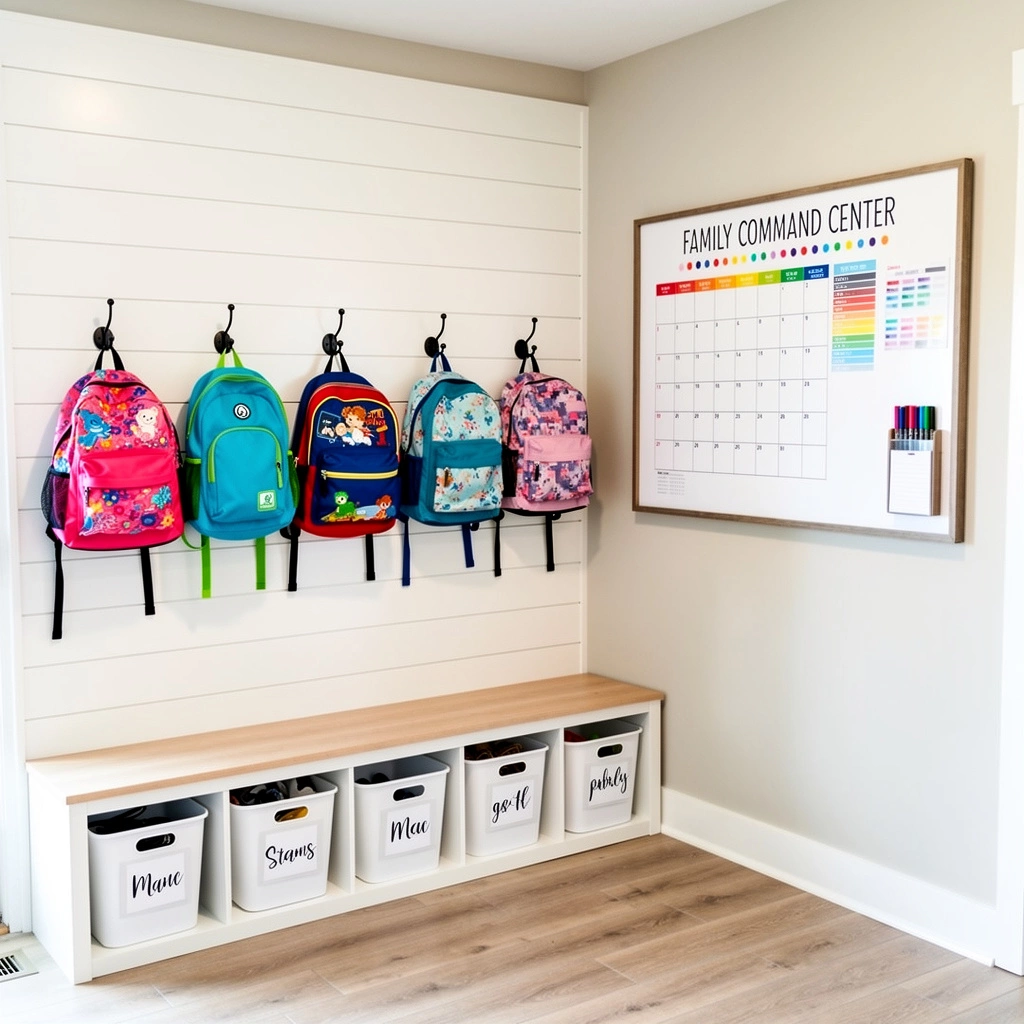
Hack 1: The Landing Zone
What it is: A dedicated space within ten feet of your most-used entrance containing individual hooks, bins, or cubbies for each child’s daily school items.
Why it works: Children drop belongings where they enter. Placing organization tools there works with natural behavior instead of against it.
How to implement:
- Identify where backpacks actually get dropped (not where you wish they’d go)
- Install one hook per child at their shoulder height
- Place a shoe bin or tray directly below each hook
- Add a basket or bin for papers requiring parent attention
- Include a small bowl or hook for keys (for older students)
Materials needed: Hooks ($1-3 each), bins or baskets (use what you have), labels
Professional tip: Place hooks at different heights for different ages. Kindergartners can’t reach adult-height hooks. Shoulder height ensures independent use.
Common mistake: Making the landing zone too small. Backpacks are bulky. Allow at least 18 inches of width per child.
Budget version: Command hooks and cardboard boxes work perfectly. Function matters more than aesthetics.
Hack 2: The Night-Before Station
What it is: A specific spot where everything needed for tomorrow lives, packed and ready.
Why it works: Morning brains don’t make good decisions. Tired evening brains are actually better at planning than rushed morning brains.
How to implement:
- Choose a staging area near your exit (could be the landing zone)
- Establish a routine: homework done → backpack packed → placed in launch position
- Include everything needed: backpack, shoes, jacket, lunch bag, special items for tomorrow
- Make this a non-negotiable bedtime routine step
Age adaptations:
- Elementary: Parent checks packed backpack during bedtime routine
- Middle school: Child packs independently, parent spot-checks weekly
- High school: Fully independent with natural consequences for forgetting
Professional tip: Pack backpacks immediately after homework is complete, not right before bed when everyone is exhausted.
What to include: Completed homework, signed forms, library books being returned, show-and-tell items, sports equipment, musical instruments, anything needed tomorrow.
Hack 3: Morning Launch Checklist
What it is: A visual checklist showing exactly what must happen before leaving the house.
Why it works: Visual checklists reduce nagging, create independence, and prevent forgotten steps.
How to implement:
- List your actual morning non-negotiables (5-7 items maximum)
- Use pictures for non-readers, words for readers
- Place the checklist where children get ready (bathroom, bedroom, kitchen)
- Use a dry-erase format or laminated version with checkboxes
Example elementary checklist:
- ☐ Get dressed
- ☐ Eat breakfast
- ☐ Brush teeth
- ☐ Grab backpack
- ☐ Put on shoes
- ☐ Check for special items
Professional tip: Create the checklist WITH your child, not for them. Children follow systems they help design.
Common mistake: Making checklists too long. More than seven items creates overwhelm. Focus on true essentials.
Backpack and Supply Organization
Hack 4: The Backpack Reset Routine
What it is: A daily five-minute backpack emptying and reorganizing routine.
Why it works: Backpacks become chaotic when they’re never fully emptied. Daily resets prevent the black-hole effect.
How to implement:
- Make backpack unpacking part of the after-school routine
- Empty everything onto a table or counter
- Sort into three categories: trash, things that stay home, things that return to school
- Immediately file papers in the home system
- Repack only what’s needed for tomorrow
Professional tip: Do this BEFORE snacks or screen time. After treats, motivation disappears.
Time investment: 3-5 minutes daily prevents 45-minute weekend excavations.
What to remove daily: Lunch containers, permission slips, graded papers, trash, forgotten water bottles, artwork.
What stays in backpack: Pencil pouch, folders for current units, ongoing library books, emergency supplies.
Hack 5: Supply Station at Home
What it is: A centralized, labeled storage system for school supplies that allows children to restock independently.
Why it works: Running out of glue sticks at 8 PM creates stress. Visible, accessible supplies create independence.
How to implement:
- Use clear bins or drawer organizers
- Label each container (pictures for younger children)
- Stock basic supplies: pencils, erasers, glue sticks, crayons, markers, scissors, notebook paper
- Place at child height in a homework area or closet
- Restock during back-to-school sales
Categories to organize:
- Writing tools (pencils, pens, erasers)
- Art supplies (crayons, markers, colored pencils)
- Paper products (notebook paper, construction paper)
- Adhesives (glue sticks, tape, stapler)
- Organization tools (folders, binders, dividers)
Professional tip: Buy extras during back-to-school sales when prices drop. A year’s supply of glue sticks costs less in August than throughout the school year.
Budget version: Repurpose shoe boxes or food storage containers. Labels matter more than matching bins.
Hack 6: Color-Coded Family System
What it is: Assigning each child a specific color for all their belongings, supplies, and organization materials.
Why it works: Visual differentiation prevents “that’s mine” arguments and helps everyone quickly identify ownership.
How to implement:
- Assign each child a color (let them choose when possible)
- Use that color for: folders, bins, hooks, towels, water bottles, notebooks
- Mark shared items (library books, permission slips) with the child’s color
- Maintain consistency across all organization systems
Example color assignments:
- Child 1: Blue
- Child 2: Red
- Child 3: Green
- Child 4: Purple
Professional tip: Use colored duct tape or electrical tape to mark items that don’t come in your child’s color.
What to color-code: Backpack tags, lunch bags, water bottles, hooks, storage bins, folders, binders, bathroom towels, hampers.
Common mistake: Switching colors. Consistency creates automatic recognition. Stick with assigned colors across school years.
Hack 7: The Pencil Pouch Solution
What it is: A fully stocked pencil pouch that lives in the backpack with everything needed for daily work.
Why it works: Hunting for a working pencil wastes time. Pre-stocked pouches ensure readiness.
What to include:
- 5-6 sharpened pencils
- 2 pens (for older students)
- 1 eraser
- 1 small pencil sharpener
- 2-3 glue sticks
- 1 small pair of scissors
- 4-5 colored pencils or markers (for highlighting/color-coding)
Weekly maintenance: Every Sunday, sharpen pencils, check supplies, restock as needed.
Professional tip: Buy pencil pouches with clear windows so children can see supply levels without opening.
Age adaptations:
- Elementary: Parent restocks weekly
- Middle school: Child restocks, parent checks monthly
- High school: Independent management
Homework and Paper Management
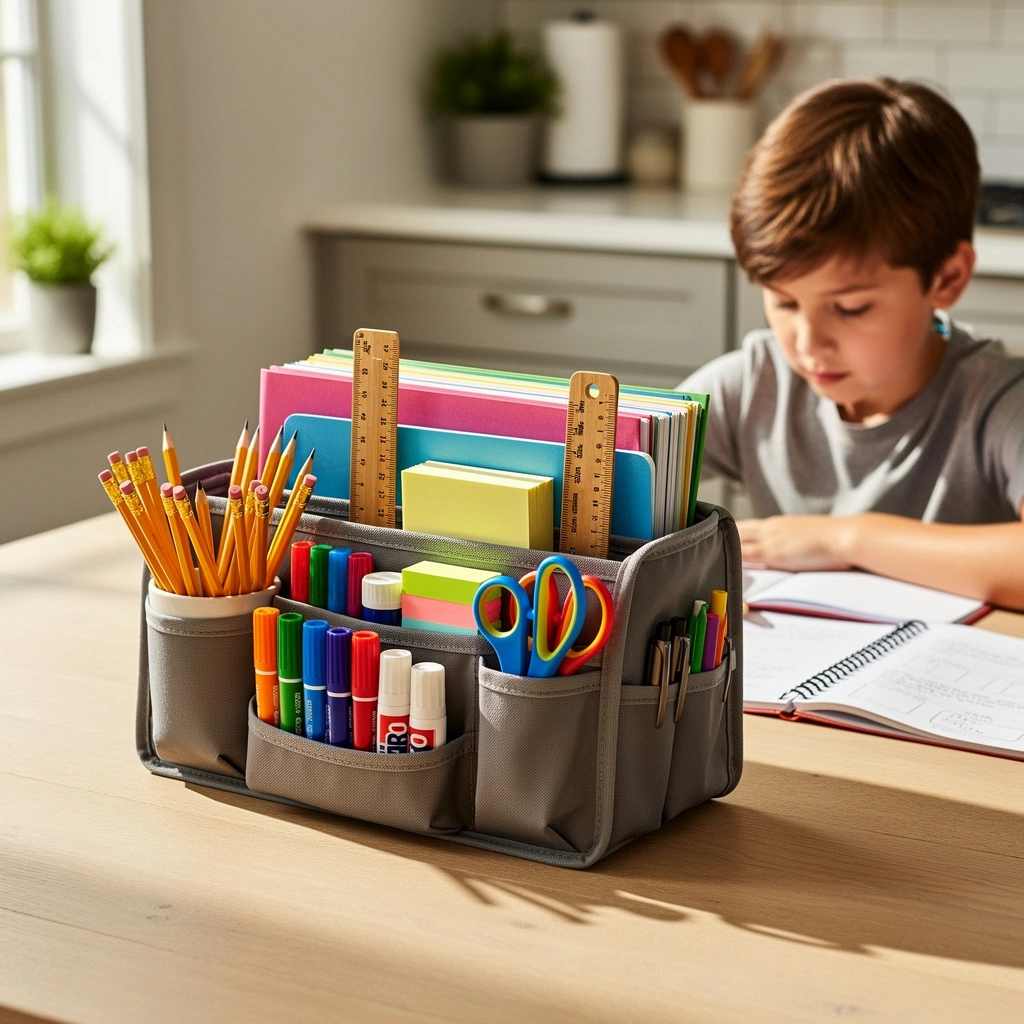
Hack 8: The Portable Homework Station
What it is: A caddy or bin containing all homework supplies that can move to wherever homework happens.
Why it works: Not every family has dedicated homework desk space. Portable stations work anywhere.
What to include:
- Pencils, pens, erasers
- Calculator
- Ruler
- Glue stick
- Scissors
- Colored pencils
- Sticky notes
- Paper clips
- Timer
Container options: Shower caddy, craft organizer, utensil caddy, small handled bin, tackle box.
Professional tip: Keep the station fully stocked. Searching for scissors breaks focus and wastes time.
Where it lives: Near the homework area when not in use, easily grabbed when needed.
Common mistake: Letting supplies migrate. After homework, everything returns to the station before other activities.
Hack 9: The Inbox-Outbox System
What it is: Two designated trays or folders – one for papers coming from school, one for papers returning to school.
Why it works: Papers need a home the second they leave the backpack. This system creates immediate organization.
How to implement:
- Label two trays, folders, or wall-mounted pockets: “FROM SCHOOL” and “TO SCHOOL”
- Place them in the landing zone or homework area
- Train children to immediately place papers in the FROM SCHOOL inbox during backpack reset
- Parents check FROM SCHOOL inbox daily
- Completed forms, signed papers, and homework go in TO SCHOOL outbox
- Everything in TO SCHOOL returns to backpack during night-before routine
Professional tip: Process the FROM SCHOOL inbox daily, not weekly. Papers buried under other papers get forgotten.
What goes in FROM SCHOOL: Permission slips, graded work, newsletters, fundraising information, teacher notes, event flyers.
What goes in TO SCHOOL: Signed forms, completed homework, library books being returned, lunch money, notes to teachers.
Hack 10: Digital Photo Backup
What it is: Photographing important papers and artwork before filing or discarding.
Why it works: Keeps memories and information without physical clutter.
What to photograph:
- Artwork you can’t keep (photograph, then let child choose to keep or discard)
- Perfect papers and tests
- Important school information (class lists, teacher contact info, school calendar)
- Projects before they go to school
- Report cards
Storage system: Create a folder on your phone or cloud storage with subfolders by child and school year.
Professional tip: Photograph special artwork, then create annual photo books. Children can enjoy their creations without storing boxes of papers.
Time investment: 30 seconds per item prevents years of paper accumulation.
Hack 11: Sunday Paper Purge
What it is: A weekly 10-minute routine to process, file, or discard papers.
Why it works: Weekly maintenance prevents overwhelming monthly sorting sessions.
The process:
- Gather all papers from backpacks, inboxes, and homework areas
- Sort into four piles: TRASH (most papers), FILE (report cards, important notices), ACTION NEEDED (forms to sign), KEEP FOR NOW (current unit study guides)
- Immediately trash the trash pile
- File keepers in a simple filing system (one folder per child per year works)
- Complete action items or add to your to-do system
- Return current-unit papers to a designated folder
What to keep:
- Report cards
- Standardized test scores
- IEP or 504 documentation
- Medical forms
- Milestone assignments
What to discard:
- Daily work
- Graded assignments after recording the grade
- Most artwork (after photographing)
- Old permission slips
- Expired school lunch menus
Professional tip: Children should participate in this process. It teaches decision-making and prevents attachment to every paper.
Time and Routine Hacks
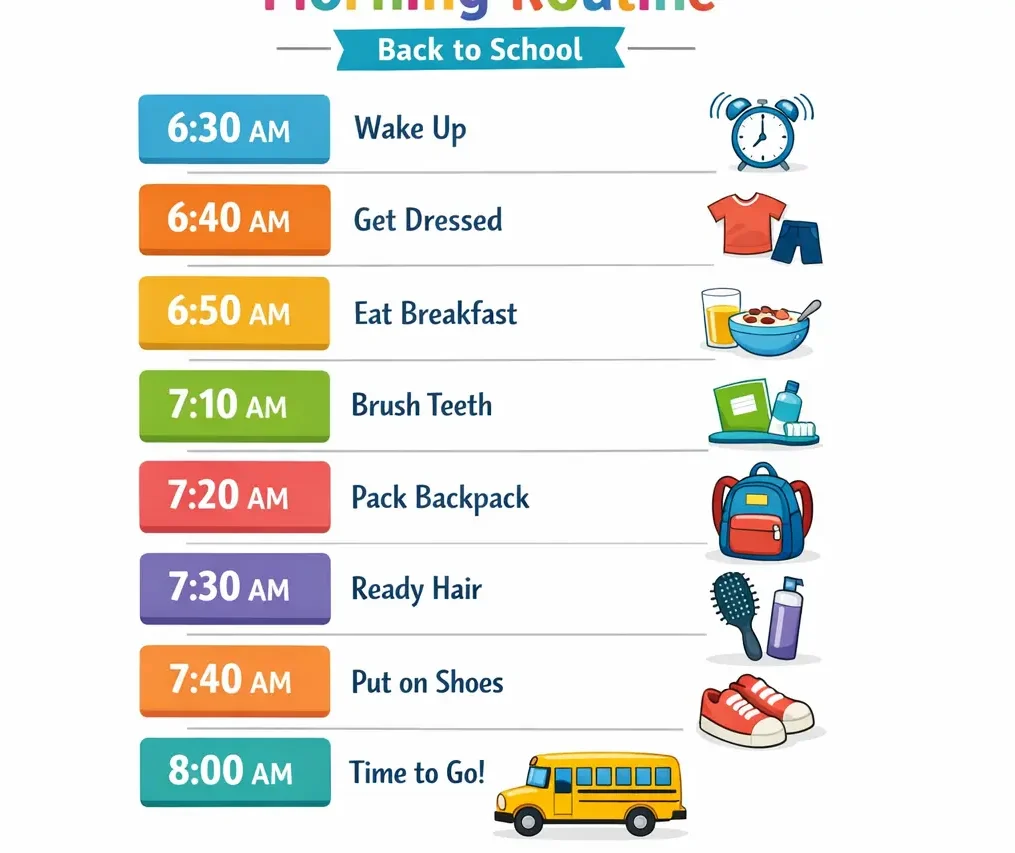
Hack 12: Visual Morning Timeline
What it is: A visual representation of the morning schedule showing what happens when.
Why it works: Reduces time-checking questions and helps children pace themselves independently.
How to create:
- Identify wake-up time and departure time
- Block out time for each morning task
- Create a visual timeline using pictures or words
- Include clock times for children who can tell time
- Display prominently in the getting-ready area
Example timeline (7:00 AM departure):
- 6:00 – Wake up
- 6:10 – Get dressed
- 6:20 – Breakfast
- 6:40 – Brush teeth, wash face
- 6:50 – Backpack, shoes, coat
- 7:00 – Leave
Professional tip: Build in buffer time. If a task takes 8 minutes, allocate 10.
Age adaptations:
- Young children: Picture-based timeline with color-coded time blocks
- Older children: Written timeline with specific times
- Teens: Digital calendar alerts
Hack 13: The Backwards Routine
What it is: Planning morning routines by working backward from the departure time.
Why it works: Starting with a non-negotiable endpoint creates realistic time allocation.
How to implement:
- Identify the absolute latest departure time
- List everything that must happen before leaving
- Assign time to each task (be realistic, not optimistic)
- Add 10-15 minute buffer
- Calculate the required wake-up time
- Set alarms accordingly
Example calculation:
- Departure: 7:30 AM
- Buffer time: 15 minutes = 7:15 target ready time
- Shoes/coat/backpack: 5 minutes = 7:10
- Brush teeth/hair: 10 minutes = 7:00
- Eat breakfast: 20 minutes = 6:40
- Get dressed: 10 minutes = 6:30
- Required wake time: 6:30 AM
Common mistake: Using optimistic time estimates. Time actual tasks for one week, then plan based on reality.
Professional tip: The first week of school, wake up 15 minutes earlier than calculated. Adjust after learning the actual routine timing.
Hack 14: Activity Command Center
What it is: A centralized location displaying the family schedule, important dates, and activity information.
Why it works: Reduces “when is practice?” questions and prevents scheduling conflicts.
What to include:
- Large monthly calendar showing all activities
- Weekly schedule showing recurring commitments
- Contact list for coaches, teachers, activity leaders
- Important dates (early dismissals, school holidays, project due dates)
Location options: Kitchen wall, entryway, inside pantry door, family room wall.
Tools needed: Large calendar (paper or dry-erase), markers, push pins or magnets.
Professional tip: Color-code by child using their assigned colors. Visual differentiation prevents confusion.
Maintenance routine: Sunday evening family meeting to review the coming week and update the calendar.
Clothing and Lunch Preparation
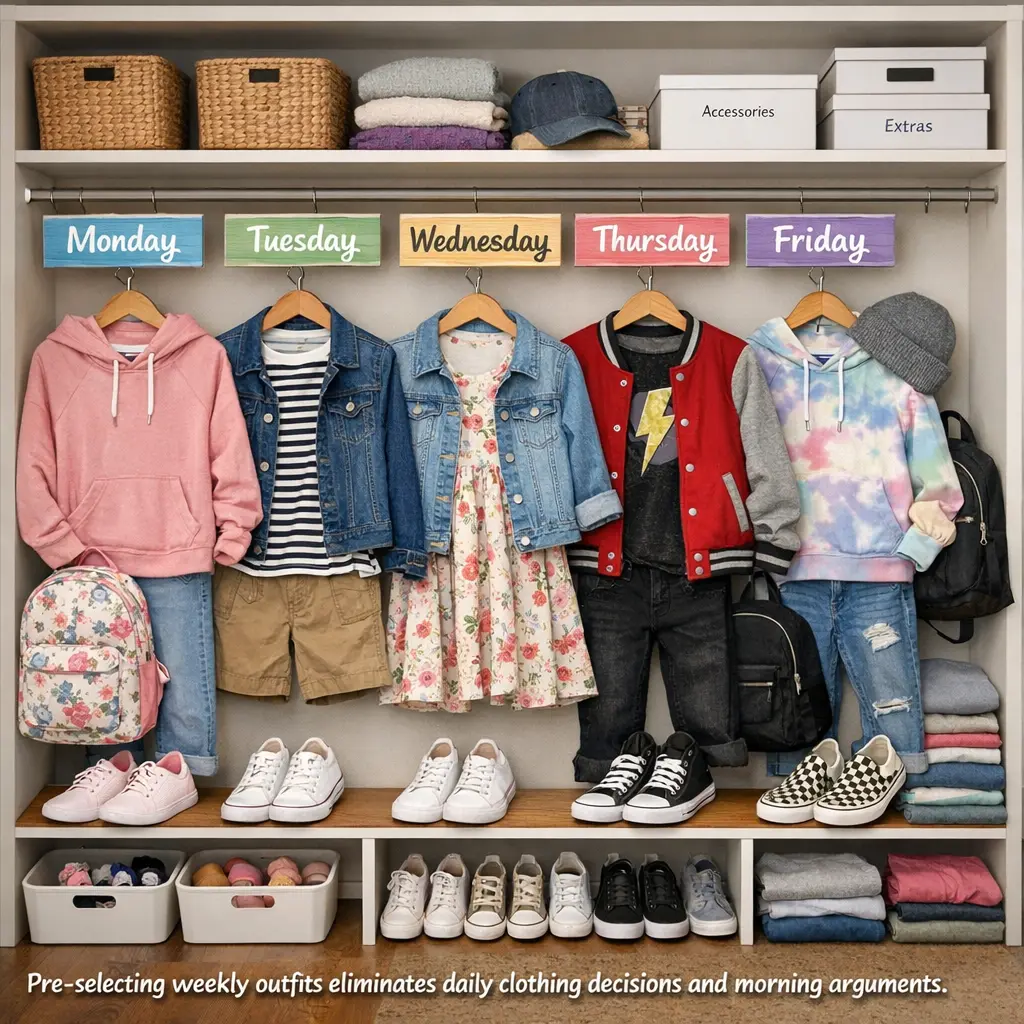
Hack 15: Five-Day Outfit System
What it is: Selecting and organizing five complete outfits every Sunday, eliminating daily clothing decisions.
Why it works: Removing decisions removes arguments and time waste.
How to implement:
- Every Sunday, child selects five complete outfits (including socks and underwear)
- Hang outfits together or place in labeled drawer organizers
- Label or number outfits Monday-Friday
- Each morning, grab the day’s outfit
Organization methods:
- Hanging: Use cascading hangers with all pieces clipped together
- Drawer dividers: Separate compartments for each day
- Shelf bins: One bin per outfit
- Over-door organizer: One pocket per day
Professional tip: Include weather-checking in Sunday routine. Minnesota winters and Texas summers require different approaches.
Common mistake: Overthinking this. Outfits don’t need to be Instagram-perfect. Clean, weather-appropriate, and school-dress-code-compliant is sufficient.
Age adaptations:
- Elementary: Parent selects or approves outfits
- Middle school: Child selects independently
- High school: Optional system for those who want it
Hack 16: Lunch Prep Assembly Line
What it is: Batch-preparing lunch components to make daily packing quick and easy.
Why it works: Making one lunch takes 10 minutes. Making five takes 20.
Sunday prep tasks:
- Wash and portion fruits and vegetables into containers
- Make sandwiches and freeze (works for most varieties except those with fresh vegetables)
- Portion crackers, pretzels, or chips into reusable containers
- Prep drinks (fill water bottles, portion juice boxes)
- Designate grab-and-go items
Daily assembly:
- One item from each category
- Pack in insulated lunch bag
- Add ice pack
- Place in night-before station
Professional tip: Let children assemble their lunches from prepped options. Increases buy-in and eating likelihood.
Budget version: Skip pre-packaged snacks. Cut bulk items into portions using reusable containers.
What freezes well: PB&J, deli sandwiches (no tomato/lettuce), bagels with cream cheese, banana bread, muffins, cookies.
What doesn’t freeze well: Fresh vegetables, mayonnaise-based items, hard-boiled eggs, yogurt.
Digital Organization
Hack 17: Centralized Family Calendar
What it is: One shared digital calendar showing all family members’ schedules and commitments.
Why it works: Prevents double-booking, missed activities, and communication breakdowns.
Recommended platforms: Google Calendar, Apple Calendar, Cozi, FamCal.
How to set up:
- Create one calendar with different colors for each family member
- Input recurring activities (sports practices, music lessons, regular appointments)
- Add school calendars (early dismissals, holidays, school events)
- Share with all appropriate family members
- Enable notifications for time-sensitive events
What to include:
- School schedules
- Activity practices and games
- Doctor and dentist appointments
- School events (conferences, performances, parties)
- Project due dates
- Test dates
- School holidays and breaks
Professional tip: Older children should input their own commitments. Creates ownership and awareness.
Common mistake: Creating separate calendars for different children. One combined, color-coded calendar works better.
Hack 18: School App Folder
What it is: A dedicated folder on your phone containing all school-related apps.
Why it works: Centralized access reduces time hunting for school apps when you need information quickly.
Apps to include:
- School district app
- Teacher communication apps (ClassDojo, Remind, Seesaw)
- Lunch account app
- School library app
- Learning platforms (Google Classroom, Canvas, Schoology)
- Gradebook access
- Bus tracker (if applicable)
Organization tip: Arrange apps in order of frequency of use.
Professional tip: Enable notifications only for time-sensitive apps. Too many notifications create alert fatigue.
Bonus hack: Screenshot frequently needed information (school phone numbers, calendar, pick-up procedures) and save in a “School Info” photo album.
Multi-Child Management
Hack 19: Individual Color System
What it is: Extending color-coding to every aspect of school organization for multiple children.
Why it works: Instant visual identification prevents mixing up belongings and assignments.
What to color-code:
- Landing zone hooks and bins
- Lunch bags and water bottles
- Folders and binders
- Towels and bathroom items
- Laundry baskets
- Chore charts
- Calendar entries
- Supply bins
Professional tip: Use colored tape to mark items that don’t come in assigned colors.
Shopping strategy: Stock up on each child’s color during back-to-school sales. Next year’s folders can be this year’s price.
Hack 20: Sibling Supply Sharing
What it is: A centralized supply system where children share common items instead of each having individual supplies.
Why it works: Reduces duplication, saves money, and teaches resource sharing.
Shared supply categories:
- Crayons and colored pencils
- Glue sticks
- Scissors
- Rulers
- Calculators (if multiple aren’t needed simultaneously)
- Art supplies
- Stapler and tape
Individual supply categories:
- Pencils and pens (personal pencil pouches)
- Notebooks and folders (class-specific)
- Backpacks
- Lunchboxes
- Personal items
Professional tip: Shared supplies live in the centralized supply station (Hack 5). Individual supplies stay in personal spaces or backpacks.
Common mistake: Forcing sharing of items that cause arguments. If crayons create conflicts, each child gets their own set.
Making Organization Stick
Simple systems succeed. Complicated systems fail.
Success factors:
Consistent locations – Everything has one home. Not sometimes one place, sometimes another. Always the same spot.
Visible systems – Clear bins, labels, open shelves. What you can see gets used. Hidden organization gets forgotten.
Age-appropriate independence – Systems should require minimal adult intervention. If you’re doing all the organizing, the system isn’t working.
Natural consequences – Forgot homework because backpack wasn’t packed? Natural consequence. Rescue once with a conversation. Don’t create a rescue habit.
Weekly resets – Even the best systems need maintenance. Sunday 15-minute resets prevent system breakdown.
Habit stacking – Attach new routines to existing habits. After dinner → pack backpack. Before screen time → complete morning checklist.
The two-week rule – New routines feel awkward for about two weeks. Push through. Week three is when systems become automatic.
Maintenance, not perfection – Systems will occasionally break down. That’s normal. A quick reset gets back on track. Perfection isn’t the goal. Functionality is.
Age-Specific Adaptations
Elementary School (Grades K-5):
- Heavy parent involvement in creating systems
- Visual cues (pictures, color-coding, labeled photos)
- Simple checklists with 5-7 items maximum
- Daily parent checks of backpacks and folders
- Physical, tangible organization (avoid digital-only systems)
- Immediate proximity (landing zones, homework stations right where used)
Middle School (Grades 6-8):
- Transition to independence with parent oversight
- Combination of visual and written organization
- Introduction of digital tools alongside physical systems
- Weekly parent check-ins rather than daily
- Natural consequences for forgotten items
- Student leadership in creating their own systems
High School (Grades 9-12):
- Student-led organization with minimal parent involvement
- Primarily digital organization with physical backup
- Focus on time management and planning skills
- Parent role shifts to consultant, not manager
- Full ownership of consequences
- Preparation for college-level independence
Special Considerations:
Children with ADHD, executive function challenges, or learning differences may need:
- Extra visual cues and reminders
- Simplified systems with fewer steps
- More frequent check-ins and resets
- Extended transition time for new routines
- Timer-based systems to support time awareness
- Systems that reduce working memory demands
Troubleshooting Common Problems
Problem: Child won’t use the systems
Solutions:
- Involve them in creating the system
- Simplify – it might be too complicated
- Check placement – is it truly convenient?
- Assess natural consequences – are you rescuing too often?
- Try a different approach – some children respond to timers, others to checklists
Problem: Morning chaos despite organization
Solutions:
- Wake up 15 minutes earlier (resistance means insufficient time)
- Move more tasks to the night before
- Reduce morning choices (pre-selected outfits, same breakfast rotation)
- Try the backwards routine (Hack 13) with realistic time estimates
Problem: Papers still getting lost
Solutions:
- Make backpack reset non-negotiable before other activities
- Implement immediate inbox system (papers go directly from backpack to inbox)
- Try digital photos of important papers as backup
- Check that your filing system is truly simple enough
Problem: Systems work for one week then fail
Solutions:
- Too complicated – simplify
- Not visible enough – increase visual cues
- Habit not established – push through the two-week awkward period
- Missing weekly reset – schedule 15-minute Sunday maintenance
Problem: Fighting about organization
Solutions:
- Natural consequences instead of arguments
- Visual systems reduce nagging
- Give children more control over their systems
- Focus on outcomes, not methods (backpack packed matters; how they organize it doesn’t)
Problem: Different systems for different children
Solution: This is fine. Children have different needs. Color-coding helps differentiate. What works for one may not work for another.
FAQS
How many organization hacks should I start with?
Start with three: a landing zone (Hack 1), night-before preparation (Hack 2), and backpack reset routine (Hack 4). Master these before adding more. Implementing all 20 simultaneously overwhelms everyone. After two weeks of consistent use, add 2-3 more hacks addressing your biggest remaining challenges.
What if I don’t have space for a homework station?
Use a portable homework caddy (Hack 8) that stores in a closet and comes out when needed. Homework can happen at the kitchen table, coffee table, or any clear surface. The caddy brings all supplies to wherever homework happens. Many families successfully use dining tables, breakfast bars, or even clipboard-based systems without dedicated desk space.
How do I get my child to actually maintain these systems?
Involve them in creating the systems from the beginning. Children follow systems they help design. Start with natural consequences – if the backpack isn’t packed, they experience the consequences at school. Check systems together for the first two weeks, then gradually transfer responsibility. Make organization a prerequisite for desired activities (screen time, play dates). Celebrate successes more than criticizing failures.
Should every child have the same organization system?
No. Different ages need different systems. Different personalities work better with different approaches. Use color-coding to differentiate, but customize the actual organization method to each child’s age and working style. What matters is that each child has a system that functions for them, not that everyone uses identical methods.
How do I handle paper clutter from multiple children?
Use the color-coding system (Hack 6) with the inbox-outbox method (Hack 9). Each child has their own color-coded inbox. Implement the Sunday paper purge (Hack 11) ruthlessly. Photograph artwork and special papers (Hack 10). Create one simple filing system: one folder per child per school year. Most papers get discarded. Only keep report cards, standardized tests, and truly significant work.
What organization supplies do I actually need?
Start with what you have. Cardboard boxes work as well as expensive bins. Essential items: hooks (one per child), some type of container for each child’s items, labels, and a place for papers. Everything else is optional. Command hooks, shoe boxes, and masking tape create functional systems. Invest in prettier solutions only after proving the system works with basic materials.
How long do these routines take to become habits?
About two weeks of consistent practice. The first week feels awkward and requires constant reminders. The second week still needs prompting but starts feeling more natural. By week three, routines become more automatic. Build in accountability during the establishment phase – checklist completed before screen time, backpack packed before dinner. After habits form, the external motivation can fade.
What if mornings are still chaotic?
Move more preparation to the night before. Lay out clothes, pack lunches, organize backpacks, even set out breakfast items. Morning time should be execution only, not decision-making. Try waking everyone 15 minutes earlier – insufficient time is the most common cause of morning chaos. Use visual timelines (Hack 12) so children can pace themselves without constant time checks.
How do I organize school supplies I buy in bulk?
Create a supply station (Hack 5) using clear, labeled containers. Store like items together: all glue sticks in one bin, all notebooks in another. Keep current supplies in children’s backpacks or pencil pouches. Store bulk supplies in a closet, basement, or high shelf, restocking the accessible supply station monthly. This prevents waste while ensuring supplies are available when needed.
Should I organize my child’s backpack for them?
For elementary students, organize it together, teaching the system. For middle schoolers, they organize independently while you spot-check weekly. For high schoolers, it’s their responsibility with natural consequences for disorganization. The goal is progressive independence. Start with high involvement and gradually transfer responsibility as they demonstrate capability.
How do I organize when we have before-school activities?
Use the night-before system even more strictly. Everything must be ready the evening before. Consider keeping a separate bag packed for recurring morning activities (sports equipment, instrument). For early morning practices, prepare grab-and-go breakfast options Sunday evening. The tighter the morning timeline, the more critical night-before preparation becomes.
What’s the best way to organize digital schoolwork?
Create a folder structure on the computer: School Year → Subject → Unit. Teach file naming conventions (Math_Chapter5_Homework_Oct15). Use cloud storage (Google Drive, OneDrive) so work is accessible from any device. Take screenshots of important online information. Bookmark frequently used learning platforms in a School folder in the browser.
External Authority Sources
Organization and Child Development:
- National Association of School Psychologists (NASP) – research on executive function and organization skills
- American Academy of Pediatrics – guidance on age-appropriate independence and routines
- Child Mind Institute – resources on organizational skills for children with ADHD and learning differences
Education:
- U.S. Department of Education – resources for parent involvement in education
- National PTA – homework and organization guidelines
- Individual state departments of education for specific requirements
Time Management and Productivity:
- American Psychological Association – research on habit formation and routine development
- National Institutes of Health – studies on sleep, routines, and child development
Safety and Nutrition:
- USDA Food Safety – guidance on lunch preparation and food storage
- Centers for Disease Control and Prevention (CDC) – recommendations for school-age children’s health routines
Note: Access these organizations’ official websites directly by searching their names. Specific research and guidelines are available in their family resources and education sections.
Tags: back to school organization, back to school organization ideas, school organization hacks, organize for back to school, student organization tips, back to school organization for kids, back to school organizing, organize kids for school, school year organization, classroom organization at home, homework organization systems, morning routine, homework station, backpack organization, school supply storage, study space, time management for students, paper organization, digital organization for students, locker organization, school lunch prep, how to organize school supplies at home, best way to organize backpack for school, create homework station small space, organize multiple kids for school, school organization hacks for teens, cheap back to school organization ideas, how to organize for back to school, what is the best way to organize school supplies, how to keep kids organized during school year, how to organize homework and papers, how to create a homework station


Leave a Reply