


Choosing the right calculator for high school math can feel overwhelming. You face dozens of models, price ranges from $15 to $180, and confusing terminology like “CAS” and “graphing capabilities.” Pick the wrong calculator, and you might waste money on features you don’t need—or worse, discover your calculator isn’t allowed on test day.
This guide cuts through the marketing noise to help you find the best calculators for high school math based on your specific courses, testing needs, and budget. You’ll learn which models work for Algebra 1 versus AP Calculus, what standardized tests actually allow, and whether you need a $150 calculator or if a $25 model will serve you well.
By the end, you’ll know exactly which calculator to buy, where to save money, and how to avoid common purchasing mistakes that frustrate thousands of students every year.
Understanding Calculator Types for High School Math
High school calculators fall into three main categories. Understanding these differences helps you avoid overspending or buying insufficient capability.
Four-Function Calculators
What they do: Basic arithmetic (addition, subtraction, multiplication, division), percentages, square roots.
Best for: Elementary math and basic household calculations.
Why they’re insufficient: High school math requires trigonometric functions, logarithms, scientific notation, and statistics that four-function calculators cannot handle.
Cost: $5-15
Bottom line: Not recommended for any high school math course.
Scientific Calculators
What they do: Everything four-function calculators do, plus trigonometry (sine, cosine, tangent), exponents, logarithms, scientific notation, fractions, statistics basics, and sometimes basic matrix operations.
What they cannot do: Graph equations, solve systems of equations visually, create tables of values, or run complex programs.
Best for:
- Algebra 1
- Geometry
- Some Algebra 2 courses (check with teacher)
- Physical science and chemistry courses
Test compliance: Allowed on all standardized tests (SAT, ACT, AP, IB).
Display: Single-line or multi-line text display (no graphing screen).
Cost: $15-35
Example models:
- TI-30X IIS ($18-25)
- Casio fx-300ES PLUS ($13-18)
- Sharp EL-W516XBSL ($15-20)
Bottom line: Perfect for early high school math. Saves money if graphing capabilities aren’t required yet.
Graphing Calculators
What they do: Everything scientific calculators do, plus:
- Graph functions (linear, quadratic, polynomial, trigonometric, exponential)
- Create tables of values
- Solve systems of equations
- Perform matrix operations
- Run statistics regression analysis
- Execute programmed sequences
- Store multiple functions simultaneously
What separates basic from advanced models:
- Screen resolution and color
- Processing speed
- Memory capacity
- Computer connectivity
- Touchscreen capability
- CAS (Computer Algebra System) features
Best for:
- Algebra 2
- Pre-Calculus
- Trigonometry
- Calculus (AB and BC)
- Statistics
- Physics
Test compliance: Most models allowed on SAT, ACT, and AP exams (with important CAS exceptions—see test policy section).
Display: Large graphing screen, often with split-screen capabilities.
Cost: $60-180
Bottom line: Required for advanced high school math. Investment lasts through college.
CAS Calculators (Computer Algebra System)
What they add: Symbolic manipulation—solving equations algebraically, factoring expressions, taking derivatives symbolically, computing integrals without numerical methods.
Example: A CAS calculator can solve “x² + 5x + 6 = 0” and return “x = -2 or x = -3” symbolically. Regular graphing calculators require numerical approximation or programming.
Critical limitation: CAS calculators are banned on SAT and ACT exams. Some AP exams allow them (AP Calculus BC), while others don’t (AP Statistics).
Models:
- TI-Nspire CX II CAS ($175-190)
- HP Prime (has CAS mode) ($120-150)
Bottom line: Powerful for homework and certain AP exams, but test restrictions make non-CAS graphing calculators safer general-purpose choices.
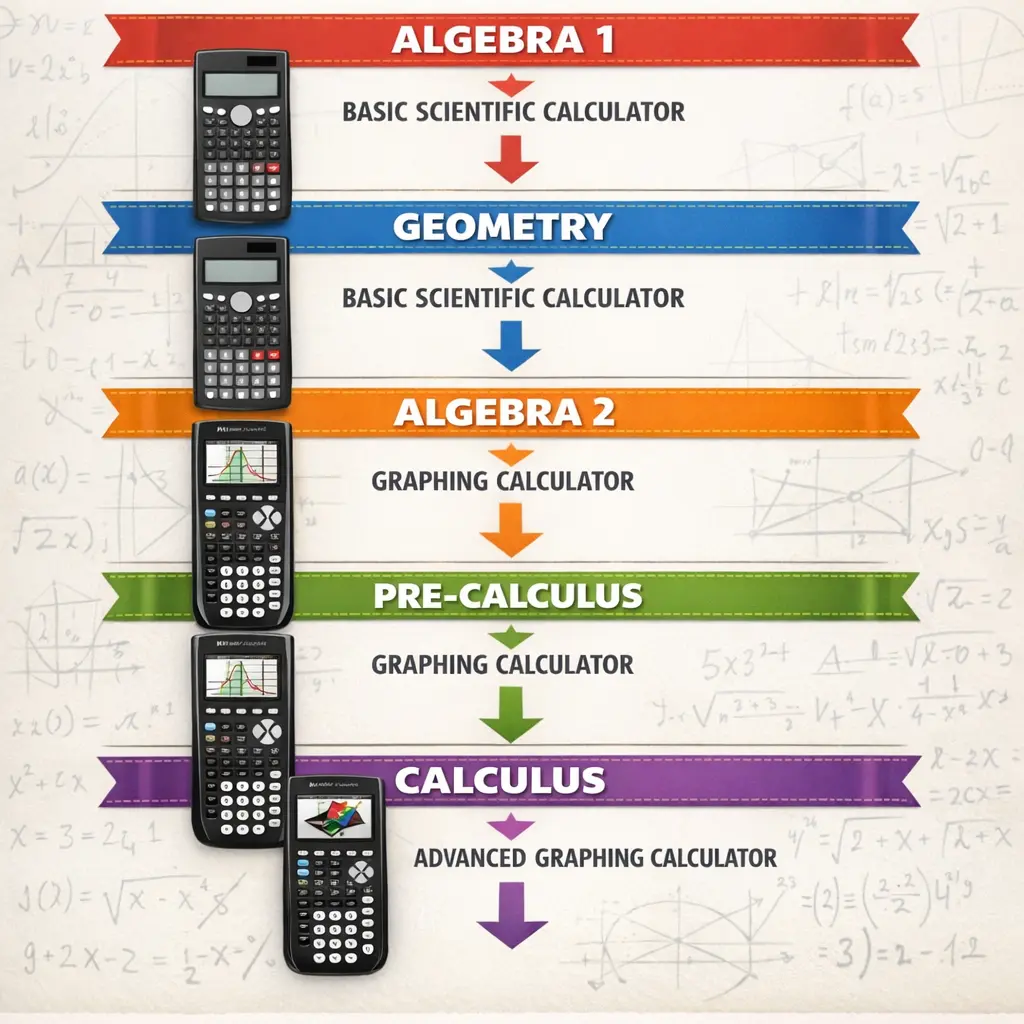
Calculator Requirements by Math Course
Different math courses demand different calculator capabilities. Here’s what you actually need.
Algebra 1
Calculator type needed: Scientific calculator
Why: Algebra 1 focuses on solving equations, simplifying expressions, and basic graphing concepts introduced on paper. You’ll work with exponents, square roots, and scientific notation, but graphing features aren’t necessary.
Recommended models:
- TI-30X IIS ($18-25) – Two-line display, fraction capabilities
- Casio fx-300ES PLUS ($13-18) – Natural textbook display, excellent value
Could you use a graphing calculator? Yes, but it’s overkill. Save money for now unless you know you’ll need graphing capabilities next year.
Test notes: Scientific calculators are allowed on all standardized assessments at this level.
Geometry
Calculator type needed: Scientific calculator
Why: Geometry emphasizes logical reasoning, proofs, and spatial relationships. Calculator use involves trigonometric functions (sine, cosine, tangent) for angle calculations and the Pythagorean theorem.
Recommended models: Same as Algebra 1
- TI-30X IIS
- Casio fx-300ES PLUS
Special note: Some advanced Geometry courses incorporate coordinate geometry graphing exercises. Check with your teacher—most still don’t require graphing calculators.
Test notes: Scientific calculators remain sufficient.
Algebra 2
Calculator type needed: Graphing calculator (begins to be necessary)
Why: Algebra 2 introduces polynomial functions, exponential and logarithmic functions, and systems of equations that benefit greatly from visual graphing. You’ll analyze function behavior, transformations, and intersections.
Recommended models:
- TI-84 Plus CE ($100-130) – Industry standard, extensive support resources
- Casio fx-9750GIII ($60-80) – Budget-friendly, capable alternative
Could you still use a scientific calculator? Some teachers allow it, but you’ll struggle with visualization and spend more time on manual graphing. Most schools begin requiring graphing calculators at this level.
Test notes: Standardized tests continue allowing both scientific and graphing calculators.
Pre-Calculus and Trigonometry
Calculator type needed: Graphing calculator (required)
Why: These courses heavily emphasize function analysis, transformations, trigonometric graphing, parametric equations, polar coordinates, and complex numbers. Graphing calculators become essential tools, not optional aids.
Recommended models:
- TI-84 Plus CE ($100-130) – Handles all Pre-Calculus topics
- TI-Nspire CX II (non-CAS) ($150-170) – Advanced features, steeper learning curve
- Casio fx-9750GIII ($60-80) – Budget option with full capability
Professional tip: This is the ideal time to invest in a quality graphing calculator if you haven’t already. It will carry you through calculus and college math courses.
Test notes: Graphing calculators approved for all major tests.
AP Calculus AB and BC
Calculator type needed: Graphing calculator (required)
Why: The AP Calculus exams have calculator-active sections where graphing calculators are required. You’ll need to compute derivatives numerically, evaluate definite integrals, solve differential equations numerically, and analyze function behavior.
Recommended models:
- TI-84 Plus CE ($100-130) – Preferred by most AP teachers
- TI-Nspire CX II (non-CAS version) ($150-170) – Advanced symbolic manipulation for homework; ensure non-CAS for exam compliance
- Casio fx-9750GIII ($60-80) – Acceptable but less common in AP classrooms
Important exam note: CAS calculators like the TI-Nspire CX II CAS are allowed on AP Calculus exams but not allowed on SAT or ACT. If you’re taking both, buy the non-CAS version.
Test notes: Check the College Board’s approved calculator list annually—policies occasionally update.
Statistics (AP Statistics)
Calculator type needed: Graphing calculator with statistics functions (required)
Why: Statistics courses involve regression analysis, probability distributions, hypothesis testing, and confidence intervals. Graphing calculators streamline these calculations significantly.
Recommended models:
- TI-84 Plus CE ($100-130) – Excellent statistics package, widely supported
- TI-Nspire CX II (non-CAS) ($150-170) – Advanced statistics applications
- Casio fx-9750GIII ($60-80) – Full statistics capabilities
Important: CAS calculators are not permitted on the AP Statistics exam. Use non-CAS models only.
Test notes: The AP Statistics exam allows most graphing calculators; verify your model on the College Board website.
Best Scientific Calculators for Early High School Math
If you’re in Algebra 1 or Geometry, these scientific calculators provide everything you need without unnecessary expense.
TI-30X IIS
Price: $18-25
Best for: Students who want reliable, straightforward functionality from the most recognized calculator brand.
Key features:
- Two-line display (shows entry and result simultaneously)
- Fraction calculations with simplification
- One- and two-variable statistics
- Trigonometric functions (degrees and radians)
- Scientific and engineering notation
Pros:
- Durable design lasts years
- Available everywhere (schools, stores, online)
- Extensive tutorial resources online
- Familiar to most teachers
Cons:
- Basic display (not natural textbook format)
- Limited memory for stored values
- Battery only (no solar option)
Bottom line: Solid, affordable choice for students who will upgrade to graphing calculators later. Trusted by millions of students.
Casio fx-300ES PLUS
Price: $13-18
Best for: Budget-conscious families seeking maximum value.
Key features:
- Natural textbook display (shows fractions, roots, and expressions as they appear in textbooks)
- 10+2 digit display
- Multi-replay function
- Table generation
- Nine variable memories
Pros:
- Exceptional value—often half the price of comparable TI models
- Natural display improves understanding
- Solar + battery power (longer battery life)
- Lightweight and compact
Cons:
- Less common in U.S. classrooms (teacher may be less familiar)
- Slightly different button layout from TI models
- Fewer online tutorials compared to TI
Bottom line: Best value in scientific calculators. Natural display format helps students see math more clearly.
Sharp EL-W516XBSL
Price: $15-20
Best for: Students wanting advanced scientific features at scientific calculator prices.
Key features:
- WriteView display (four-line natural textbook format)
- Over 640 functions
- Equation solver
- Matrix calculations (unusual for scientific calculators)
- Protective hard case included
Pros:
- Exceptional feature set for the price
- Large, clear display
- Dual power (solar + battery)
- Includes protective case
Cons:
- Much less common than TI or Casio
- Steeper learning curve due to extensive features
- Limited teacher familiarity
- Fewer support resources
Bottom line: Feature-packed option for motivated students, but obscurity creates support challenges.
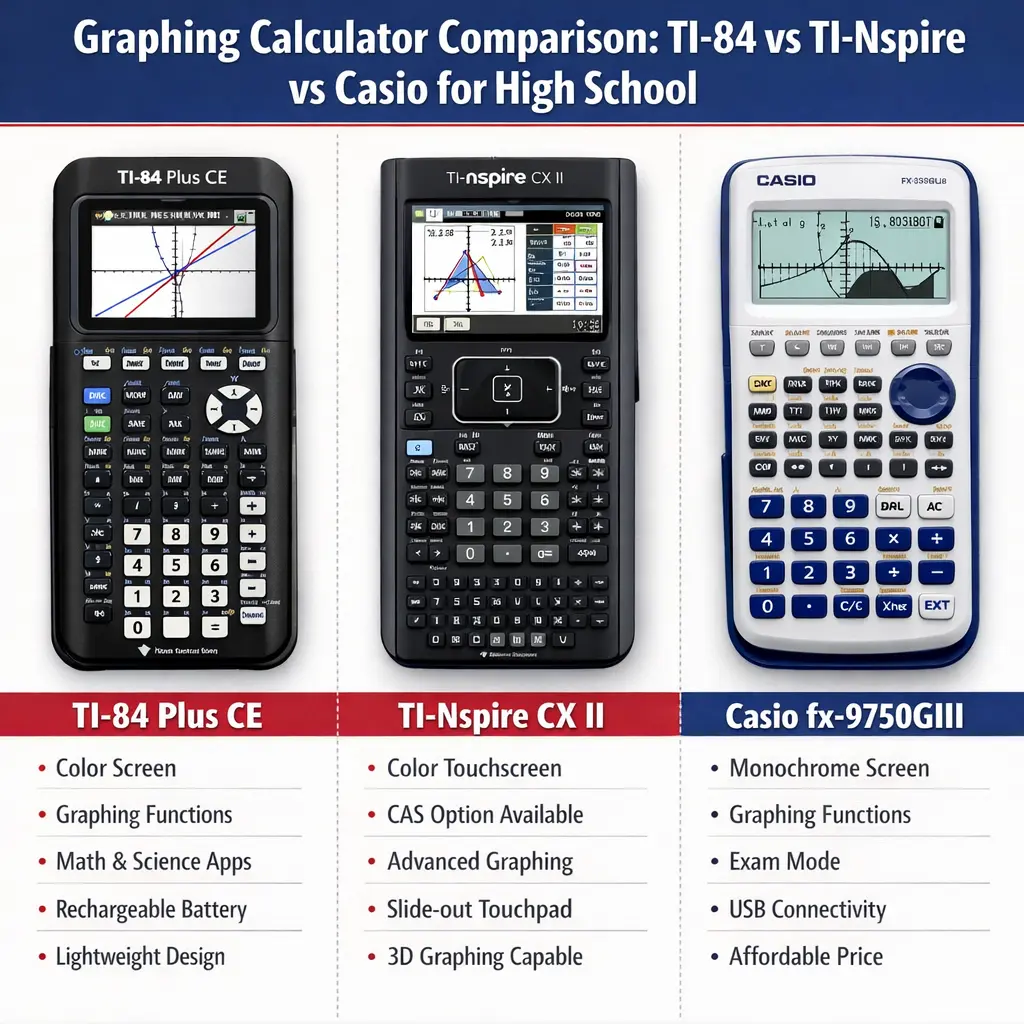
Top Graphing Calculators for High School Students
These models will carry you through advanced high school math and into college. Investment here pays dividends across multiple years and courses.
TI-84 Plus CE
Price: $100-130
Best for: Students wanting the most widely supported, teacher-recommended graphing calculator.
Why it’s the standard: The TI-84 Plus CE dominates U.S. high schools. Most teachers use it for demonstrations, most textbooks reference it, and most online tutorials assume you’re using it.
Key features:
- Full-color backlit display (320×240 resolution)
- Rechargeable battery (USB charging)
- 3.5 MB storage space
- Pre-loaded apps (Polynomial Root Finder, Probability Simulations, Transformation Graphing)
- Graphing capabilities: 10 functions simultaneously
- Statistics: regression analysis, distributions, hypothesis testing
- Matrix operations up to 10×10
- Computer connectivity (TI Connect software)
Display advantages:
- Color-coded graphs improve understanding
- Backlit screen works in any lighting
- High-resolution text reduces eye strain
Pros:
- Ubiquitous support (teacher help, YouTube tutorials, online forums)
- Approved for SAT, ACT, AP, IB exams
- Rechargeable battery (no ongoing battery costs)
- Familiar interface for students who used TI-83/84 models
- Extensive app library for specialized functions
- Holds value well (strong resale market)
Cons:
- More expensive than comparable Casio models
- Less powerful than TI-Nspire for advanced functions
- Slower processor than newer competitors
- No touchscreen (button navigation only)
Who should buy it:
- Students in Algebra 2 through AP Calculus
- Families prioritizing teacher and peer support
- Students taking SAT, ACT, or AP exams
- Anyone wanting a “set it and forget it” reliable choice
Variations to know:
- TI-84 Plus CE Python: Adds Python programming ($150-170). Useful for students interested in coding but not necessary for math courses.
- TI-84 Plus (non-CE): Older model without color screen or rechargeable battery ($85-100). Still capable but older technology.
Bottom line: If you’re buying only one calculator for all of high school, this is the safest choice. Industry standard with unmatched support network.
TI-Nspire CX II (Non-CAS)
Price: $150-170
Best for: High-achieving students in advanced courses who value powerful features and plan to use the calculator through college.
Why it’s different: The TI-Nspire platform represents Texas Instruments’ advanced calculator line. It offers more sophisticated graphing, 3D visualization, spreadsheet integration, and computer algebra capabilities (in CAS version).
Key features:
- Full-color backlit display (320×240 resolution)
- Rechargeable battery
- 100 MB storage (significantly more than TI-84)
- Touchpad navigation (no touchscreen, but improved navigation)
- Multiple representations simultaneously (graph, table, equation, geometry)
- 3D graphing capabilities
- Dynamic geometry application
- Spreadsheet application
- Advanced statistics package
- Programming in TI-Basic and Python (CX II models)
- Computer connectivity and mobile apps
CAS vs. Non-CAS:
- Non-CAS (CX II): Numerical computation. Allowed on SAT, ACT, most AP exams, IB exams.
- CAS (CX II CAS): Symbolic manipulation (solves equations algebraically). NOT allowed on SAT or ACT. Permitted on AP Calculus BC and some other AP exams.
Important: If you’re taking SAT or ACT, buy the non-CAS version to ensure test compliance.
Pros:
- Most powerful allowable calculator for standardized tests
- Excellent for visualizing complex concepts
- Multiple representation windows aid understanding
- Extensive memory for programs and notes
- Strong performance in college courses
- Regular software updates add functionality
Cons:
- Steeper learning curve than TI-84
- Less intuitive interface for beginners
- More expensive
- Fewer teachers use it for demonstrations
- Touchpad navigation takes adjustment
Who should buy it:
- Students in AP Calculus BC or college-level courses
- STEM-focused students planning engineering or math majors
- Students comfortable learning complex tools
- Those who want one calculator through college
Bottom line: Premium option with advanced capabilities. Excellent investment for motivated students, but TI-84 Plus CE suffices for most high school needs.
Casio fx-9750GIII
Price: $60-80
Best for: Budget-conscious families needing graphing calculator capability without premium pricing.
Why it’s compelling: The fx-9750GIII delivers graphing calculator functionality at nearly half the cost of the TI-84 Plus CE. It’s approved for all major standardized tests and handles every high school math course.
Key features:
- Large backlit display (monochrome, not color)
- USB connectivity
- Icon-based menu (user-friendly navigation)
- Graphing: 20 functions simultaneously (double the TI-84)
- Statistics: regression analysis, distributions, hypothesis tests
- Spreadsheet functionality (26 columns x 999 rows)
- Matrix calculations
- Equation solving
- Programming capability
- 61 KB memory
Pros:
- Exceptional value—best price-to-performance ratio
- Approved for SAT, ACT, AP, IB exams
- More simultaneous graphing functions than TI-84
- Spreadsheet integration helps with statistics
- Durable build quality
- Straightforward menu navigation
- AAA batteries widely available
Cons:
- Monochrome display (no color)
- Less common in U.S. classrooms (teachers may not demonstrate on it)
- Fewer online tutorials compared to TI models
- Lower resale value
- Less familiar interface for students switching from TI scientific calculators
- Limited app ecosystem
Who should buy it:
- Families on tight budgets
- Students who learn independently
- Those prioritizing functionality over brand recognition
- International students familiar with Casio products
Bottom line: Best budget graphing calculator. Sacrifices color screen and brand ubiquity but delivers full mathematical capability at half the price.
HP Prime
Price: $120-150
Best for: Students interested in advanced features, touchscreen interface, and computer algebra capabilities.
Why it’s unique: HP calculators have always offered powerful functionality and engineering-focused features. The HP Prime combines touchscreen convenience with CAS capabilities and accepts both exam mode (CAS disabled for tests) and full functionality modes.
Key features:
- Full-color touchscreen (3.5-inch diagonal)
- Rechargeable battery
- Exam mode (disables CAS for test compliance)
- CAS capabilities (symbolic manipulation)
- Advanced graphing (3D, implicit, polar, parametric)
- Spreadsheet application
- Programming (HP PPL language)
- Geometry application
- Computer connectivity and mobile app
- Fast ARM processor
Exam mode feature: Critical advantage—switches to non-CAS mode for exams, then back to CAS for homework. Single calculator serves both purposes.
Pros:
- Touchscreen navigation (most intuitive interface)
- Powerful processor (fastest calculations)
- Dual-mode capability (CAS for homework, non-CAS for tests)
- Excellent for engineering and physics
- Strong computer integration
- Modern interface feels more current than TI models
Cons:
- Rare in U.S. high schools (minimal teacher familiarity)
- Very limited support resources
- Small user community
- Different reverse Polish notation legacy (though Prime uses standard notation)
- Test proctors may question CAS compliance (even in exam mode)
Who should buy it:
- Students planning engineering majors
- Self-directed learners comfortable with new technology
- Those who value touchscreen convenience
- International students (HP more common outside U.S.)
Bottom line: Powerful, modern calculator with unique advantages, but limited U.S. educational market share creates support challenges. Best for independent, technically comfortable students.
Standardized Test Calculator Policies
Calculator policies directly impact which model you should buy. Here’s what major tests allow.
SAT Calculator Policy
Allowed calculator types:
- Scientific calculators
- Graphing calculators (non-CAS)
Prohibited:
- Calculators with CAS functionality
- Tablets, phones, laptops, smartwatches
- Calculators with QWERTY keyboards
- Calculators requiring power outlets
- Calculators that make noise or require paper
Approved graphing calculator examples:
- TI-84 Plus CE ✓
- TI-Nspire CX II (non-CAS) ✓
- Casio fx-9750GIII ✓
- HP Prime (in exam mode—verify with proctor beforehand) ✓
Prohibited graphing calculator examples:
- TI-Nspire CX II CAS ✗
- TI-89 ✗
- Any Casio ClassPad with CAS ✗
Test structure:
- Math section has calculator and no-calculator portions
- Bring backup batteries (if applicable)
Source: College Board publishes updated approved lists annually. Check collegeboard.org before test day.
ACT Calculator Policy
Allowed calculator types:
- Scientific calculators
- Graphing calculators (non-CAS)
Prohibited:
- CAS calculators
- Devices with internet access
- Phones, tablets, computers
- Calculators with QWERTY keyboards
- Calculators that make noise
Approved models:
- TI-84 Plus CE ✓
- TI-Nspire CX II (non-CAS) ✓
- Casio fx-9750GIII ✓
Prohibited models:
- TI-Nspire CX II CAS ✗
- TI-89 Titanium ✗
- HP Prime (officially on prohibited list despite exam mode) ✗
Critical difference from SAT: ACT explicitly prohibits HP Prime calculators, even in exam mode.
Test structure:
- Calculators permitted throughout entire math section
- No no-calculator portion
Source: ACT publishes approved calculator list at act.org.
AP Exam Calculator Policies
General rule: Most graphing calculators allowed, including some CAS models—but varies by exam.
AP Calculus AB and BC:
- Graphing calculators required for calculator-active sections
- CAS calculators allowed (unusual exception)
- TI-Nspire CX II CAS ✓ (permitted for AP Calculus)
- Calculator-active and calculator-inactive sections both present
AP Statistics:
- Graphing calculators permitted
- CAS calculators not allowed
- TI-Nspire CX II CAS ✗
- TI-84 Plus CE ✓
AP Physics exams:
- Calculators permitted
- Scientific or graphing calculators acceptable
- No specific advanced features required
AP Chemistry:
- Scientific calculators sufficient
- Graphing calculators allowed but not necessary
Important: Calculator policies differ by AP subject. Check College Board’s annual AP calculator policy before each exam.
IB (International Baccalaureate) Exam Policies
Allowed:
- Scientific calculators
- Graphing calculators
- Some CAS calculators
Specific rules:
- Calculators must not have symbolic algebra manipulation that can solve common IB problems (symbolic integration, differentiation, equation solving beyond numerical methods)
- Internet, communication capabilities prohibited
- Check IBO’s approved calculator list annually—updates occur
Common approved models:
- TI-84 Plus CE ✓
- Casio fx-9750GIII ✓
- TI-Nspire CX II (verify current IBO policy—changes periodically) ✓
Bottom line: IB policies can be complex. Verify your specific model against current IBO guidelines.
TI vs. Casio vs. HP: Real Differences Explained
Brand loyalty runs deep in calculators. Here’s what actually distinguishes these manufacturers.
Texas Instruments (TI)
Market position: Dominant U.S. educational market leader.
Strengths:
- Ubiquitous in U.S. schools (80%+ market share)
- Extensive teacher training and curriculum integration
- Massive online tutorial library
- Strong resale value
- Consistent user interface across models
- Excellent customer support
Weaknesses:
- Higher prices than competitors
- Slower to innovate (TI-84 design essentially unchanged since 2004)
- Proprietary software ecosystem
- Limited competition reduces pressure for improvement
Best for: Students who value guaranteed support, teacher familiarity, and peer assistance.
Casio
Market position: Strong international presence; growing U.S. market share based on value.
Strengths:
- Exceptional price-to-performance ratio
- Natural textbook display on scientific models
- More simultaneous graphing functions
- Spreadsheet integration
- Innovative features (QR code connectivity, picture overlay)
- Strong value proposition
Weaknesses:
- Less common in U.S. classrooms
- Fewer online English-language tutorials
- Teachers less familiar with button layouts
- Different menu logic from TI models
- Lower resale value in U.S.
Best for: Budget-conscious families, independent learners, international students.
Hewlett-Packard (HP)
Market position: Niche player in education; strong legacy in engineering and professional markets.
Strengths:
- Cutting-edge technology (touchscreen, fast processors)
- Dual exam/CAS modes
- Superior build quality
- Advanced engineering functions
- Modern user interfaces
Weaknesses:
- Minimal U.S. educational market share
- Very limited teacher support
- Small online community
- Test proctors may question compliance
- Higher learning curve
Best for: Engineering-focused students, international markets, users valuing cutting-edge technology.
Budget Calculator Options That Still Deliver
You don’t always need to spend $100+. These strategies save money without sacrificing capability.
Refurbished Calculators
What they are: Previously owned calculators inspected, repaired, and resold by manufacturers or retailers.
Where to find them:
- Texas Instruments website (certified refurbished)
- Amazon Renewed
- Best Buy refurbished section
- eBay from reputable sellers
Typical savings: 20-40% off new prices
Example: Refurbished TI-84 Plus CE: $70-90 (vs. $100-130 new)
Pros:
- Significant savings
- Manufacturer refurbished often includes warranty
- Identical functionality to new
- Environmentally responsible
Cons:
- Limited selection
- Possible cosmetic wear
- Shorter warranty periods
- May not include original packaging
Bottom line: Excellent option for budget-conscious families. Prioritize manufacturer-refurbished over third-party sellers.
Previous-Generation Models
Strategy: Buy last year’s model when new versions release.
Example: When TI-84 Plus CE released, older TI-84 Plus prices dropped.
Current opportunity: TI-84 Plus (non-CE) still handles all high school math at $85-100 (vs. $100-130 for CE).
Trade-off: Monochrome screen and replaceable batteries instead of color screen and rechargeable battery.
Mathematical capability: Identical—color and rechargeable battery don’t change mathematical functions.
Bottom line: Smart savings if you don’t mind older technology.
Casio Budget Champions
Models offering maximum value:
Casio fx-9750GIII ($60-80)
- Full graphing calculator capability
- All standardized test approval
- Sacrifices color screen and brand ubiquity
Casio fx-9860GIII ($80-100)
- Upgraded version with more memory
- Flash memory for software updates
- Still significantly cheaper than TI-84 Plus CE
Bottom line: Best bang-for-buck in graphing calculators. Main sacrifice is teacher familiarity, not capability.
Rental Programs
How they work: Pay annual fee to rent calculator; return at year’s end.
Typical cost: $10-20 per school year
Where available:
- School districts (check with math department)
- Office supply stores
- Online calculator rental services
Pros:
- Minimal upfront cost
- Replacement if damaged (usually)
- Try before committing to purchase
- No storage between school years
Cons:
- Can’t keep long-term
- Cumulative cost exceeds purchase over multiple years
- May receive older models
- Not available during summer
Bottom line: Makes sense for single-year needs or trial periods. Purchase wins for multi-year use.
Used Calculators (Private Purchase)
Where to find:
- Facebook Marketplace
- Craigslist
- College bulletin boards (students graduating)
- Garage sales
Typical savings: 40-60% off retail
What to check:
- Powers on and all buttons function
- Screen displays clearly (no pixel damage)
- Battery compartment isn’t corroded
- Includes battery cover
Risks:
- No warranty
- Unknown history (drops, damage)
- May need battery replacement
- Could have software issues
Bottom line: Deepest savings but buyer beware. Best when buying from known sources (family friends, neighbors).
When You Actually Need a Graphing Calculator
Don’t buy more calculator than necessary. Use this decision framework.
You NEED a Graphing Calculator If:
✓ Your teacher requires it – Always follow instructor requirements
✓ You’re taking Algebra 2 or higher – Graphing capabilities become essential for understanding function behavior
✓ You’re enrolled in AP Calculus, AP Statistics, or Physics – These courses require graphing calculator functionality
✓ Your textbook lessons assume graphing calculator use – Many curricula integrate calculator activities
✓ You struggle visualizing math concepts – Graphing helps many students understand relationships
A Scientific Calculator Still Works If:
✓ You’re in Algebra 1 or Geometry – These courses don’t require graphing capabilities
✓ Your teacher permits scientific calculators – Some Algebra 2 teachers allow scientific calculators with supplemental graphing by hand
✓ Budget is extremely tight – Scientific calculators cost $15-25 vs. $60-130 for graphing
✓ You learn well from manual graphing – Some students benefit more from hand-drawing graphs
Buy the Graphing Calculator NOW If:
✓ You’re entering Algebra 2 – Ideal time to invest; calculator lasts through remaining high school
✓ Sales are happening – Back-to-school sales (July-August) offer best pricing
✓ You’ll take multiple AP math/science courses – Investment pays off across several years
✓ You’re college-bound in STEM – Calculator use continues in college calculus, statistics, physics, engineering
Common Calculator Buying Mistakes to Avoid
Learn from these frequent errors that frustrate students and waste money.
Mistake 1: Buying CAS Calculator for SAT/ACT
The error: Purchasing TI-Nspire CX II CAS or TI-89 thinking “more powerful is better.”
The problem: These calculators are prohibited on SAT and ACT exams.
The consequence: Scrambling to borrow/buy approved calculator before test day, or taking exam without calculator you’ve practiced with.
The solution: Buy non-CAS versions (TI-Nspire CX II, TI-84 Plus CE) that work for both homework and standardized tests.
Exception: If you’re definitely not taking SAT/ACT (some students take only PSAT or focus on AP exams), CAS models offer homework advantages.
Mistake 2: Waiting Until Day Before Calculator Is Needed
The error: Putting off calculator purchase until teacher announces requirement or test date approaches.
The problem:
- Limited selection at local stores (may only have premium models)
- No time to compare prices
- Missing online deals
- No time to learn calculator before high-stakes use
The consequence: Overpaying and struggling with unfamiliar calculator during critical assignments.
The solution: Buy calculator at start of school year or when enrolling in course requiring it. Take advantage of back-to-school sales.
Mistake 3: Assuming Phone Calculator Apps Suffice
The error: “I’ll just use my phone’s calculator app or download a graphing calculator app.”
The problem:
- Phones are prohibited on all standardized tests
- Teachers prohibit phone use during many assessments (cheating concerns)
- App interfaces differ from physical calculators (skills don’t transfer)
- Phone distractions reduce learning focus
The consequence: Unprepared for tests requiring physical calculators; lower scores; academic integrity concerns.
The solution: Use a physical calculator that matches what’s allowed on your exams.
Mistake 4: Buying Calculator Not on School’s Approved List
The error: Purchasing calculator without checking teacher/school requirements.
The problem: Some schools standardize on specific models for consistency. Your calculator may work mathematically but creates classroom management issues.
The consequence:
- Teacher can’t help you (unfamiliar with your model)
- You can’t follow along during demonstrations
- Peer support unavailable
- Possible requirement to purchase school-specified model anyway
The solution: Email teacher before purchasing. Ask: “Which calculator do you recommend? Are there specific models required?”
Mistake 5: Overpaying at School Supply Stores
The error: Buying from first retailer you visit without price comparison.
The problem: Brick-and-mortar stores often charge 20-40% more than online retailers.
Example: TI-84 Plus CE at campus bookstore: $130-150. Same calculator on Amazon: $100-115.
The consequence: Wasting $30-50 unnecessarily.
The solution: Check prices at Amazon, Walmart, Best Buy, Target, and manufacturer websites. Buy from lowest-price reputable seller.
Exception: If you need the calculator immediately (exam tomorrow), convenience may justify higher price.
Mistake 6: Ignoring Battery Type
The error: Not considering long-term battery costs.
The problem:
- AAA battery models need replacement every 3-6 months ($5-10/year)
- Some older models use expensive button cell batteries
- Dead batteries during exams create disasters
Models with rechargeable batteries:
- TI-84 Plus CE (USB rechargeable)
- TI-Nspire CX II (rechargeable lithium-ion)
Models requiring AAA batteries:
- Casio fx-9750GIII (4 AAA)
- Older TI-84 Plus (4 AAA)
The solution: Factor battery costs into total ownership cost. Rechargeable models save money long-term but cost more upfront.
Calculator Accessories and Care
Protect your investment and improve functionality with these accessories.
Essential Accessories
Hard protective case ($8-15)
- Prevents screen scratches
- Protects during drops
- Many calculators include case; verify before buying separately
Screen protector ($6-10)
- Reduces scratches on touchscreen or display
- Especially important for TI-Nspire CX II and HP Prime
- Not necessary for monochrome displays with protective covers
Extra charging cable (for rechargeable models) ($8-12)
- Keep one at home, one in backpack
- TI-84 Plus CE uses mini-USB
- TI-Nspire CX II uses mini-USB
- Standard cables work (no proprietary cables required)
Backup batteries (for non-rechargeable models) ($10-15 for pack)
- Keep spares in backpack
- Replace all four AAA batteries simultaneously for best performance
- Don’t mix old and new batteries
Optional But Helpful
Computer link cable (often included)
- Transfer programs, applications, and data
- Update operating system
- Connect to online resources
- Usually mini-USB; standard cables work
Backup calculator ($15-25 scientific calculator)
- Keep inexpensive scientific calculator as emergency backup
- Useful if primary calculator malfunctions before exam
- TI-30X IIS makes excellent backup
Calculator Care Tips
Extend calculator lifespan with these practices:
Clean regularly:
- Wipe screen with soft microfiber cloth
- Use compressed air to remove debris from buttons
- Avoid liquid cleaners (can damage electronics)
Store properly:
- Always use protective case
- Remove from bottom of backpack (prevents crushing)
- Store in climate-controlled environment (extreme heat/cold damage batteries)
Manage power:
- Turn off when not in use (auto-shutoff helps but manual shutdown saves more power)
- Remove batteries if storing for extended periods (prevents corrosion)
- Charge rechargeable models every few months even when not in use (maintains battery health)
Handle carefully:
- Avoid drops (cracks internal components)
- Don’t force stuck buttons (indicates debris—clean instead)
- Keep away from liquids
Update software:
- Check manufacturer website for operating system updates
- Updates fix bugs and occasionally add features
- TI and Casio provide free updates
Rental vs. Purchase: Which Makes Sense
Calculator rental programs offer alternatives to outright purchase. Here’s when each option makes sense.
Choose RENTAL If:
✓ You need calculator for one year only – Renting for $15-20 beats buying for $100+
✓ You’re unsure which model to buy – Renting lets you test before committing
✓ Cash flow is tighter than total cost – Smaller periodic payments easier to manage
✓ School offers free or subsidized rental – Some districts provide calculators at no cost or reduced rates
✓ You’re prone to losing items – Rental programs often include replacement coverage
Choose PURCHASE If:
✓ You’ll use calculator for 2+ years – Purchase pays for itself vs. cumulative rental fees
✓ You want to use calculator outside school – Rentals often can’t leave campus or must be returned seasonally
✓ You’ll take multiple math courses – Algebra 2 through Calculus spans 3-4 years
✓ You’re college-bound in STEM – Calculator continues serving in college courses
✓ You want to customize (add programs/apps) – Rental calculators often prohibit modifications
Cost Comparison Example
Scenario: Student needs graphing calculator for Algebra 2 (sophomore year) through AP Calculus BC (senior year) = 3 years
Rental option:
- $20/year × 3 years = $60 total
- No ownership after graduation
- Cannot use during summers
Purchase option (TI-84 Plus CE):
- $110 purchase price
- Own permanently
- Use through college
- Resale value: $40-60 after 3 years
- Net cost: $50-70
Winner: Purchase (lower net cost, permanent ownership, college use)
When Rental Wins:
Scenario: Student needs calculator only for Statistics (one semester senior year)
Rental option:
- $15 for semester = $15 total
Purchase option:
- $100+ purchase
- Limited future use (not STEM major)
Winner: Rental (significant savings, no unused calculator afterward)
Getting Started with Your New Calculator
You bought the right calculator. Now learn to use it effectively.
First Steps After Unboxing
1. Charge or install batteries
- Rechargeable models: Charge fully before first use (3-4 hours)
- Battery models: Install fresh batteries (all four AAA)
2. Verify functionality
- Power on
- Check screen (no dead pixels, clear display)
- Test basic operations (2+2, simple graph)
- Navigate main menu
3. Explore basic layout
- Locate number pad
- Find graphing functions
- Locate mode settings
- Find power/on-off
4. Set preferences
- Set degree vs. radian mode (most high school work uses degrees initially)
- Adjust screen brightness (if applicable)
- Set date/time (some models)
Essential Skills to Master
Scientific calculator basics:
- Order of operations and parentheses
- Fraction calculations
- Exponents and roots
- Trigonometric functions
- Scientific notation
Graphing calculator fundamentals:
- Entering equations (Y= menu)
- Adjusting window settings (Xmin, Xmax, Ymin, Ymax)
- Graphing functions
- Creating tables of values
- Finding intersections
- Calculating zeros/roots
- Trace function
Statistics functions:
- Entering data lists
- One-variable statistics (mean, median, standard deviation)
- Two-variable statistics (regression)
- Plotting scatter plots
- Creating histograms
Learning Resources
YouTube channels:
- “TI Calculator Tutorial” channels (search your model)
- Khan Academy (math instruction includes calculator use)
- Teacher-created tutorials
Official manufacturer resources:
- Texas Instruments Education website (tutorials, downloadable guidebooks)
- Casio Education website
- HP calculator support
Manual and guidebook:
- PDF version downloadable from manufacturer
- Searchable (easier than printed manual)
School resources:
- Teacher office hours
- Math tutoring center
- Peer study groups
Practice consistently:
- Use calculator for homework (not just during tests)
- Explore functions beyond immediate course needs
- Program shortcuts for repeated calculations
FAQs
What calculator is best for all high school math courses?
The TI-84 Plus CE ($100-130) works for all high school math from Algebra 2 through AP Calculus and Statistics. It’s approved for SAT, ACT, and AP exams, widely supported by teachers, and handles graphing, statistics, and advanced functions. For early high school (Algebra 1, Geometry), a scientific calculator like the TI-30X IIS ($18-25) suffices and saves money until graphing capabilities become necessary.
Can I use my phone instead of a calculator?
No. Phones are prohibited on all standardized tests (SAT, ACT, AP exams), and most teachers ban phone use during math exams due to cheating concerns. Calculator apps don’t provide the same hands-on learning experience as physical calculators, and skills developed on apps don’t transfer to test-approved calculators. Always use a physical calculator that matches what’s allowed on your exams.
What’s the difference between TI-84 Plus and TI-84 Plus CE?
The TI-84 Plus CE (Color Edition) features a full-color backlit screen, rechargeable lithium-ion battery, thinner design, and more memory than the older TI-84 Plus. The original TI-84 Plus has a monochrome screen, uses four AAA batteries, and is slightly bulkier. Both calculators have identical mathematical capabilities—the CE offers better display quality and rechargeable convenience. The CE costs $15-30 more but saves money on batteries over time.
Are CAS calculators allowed on the SAT and ACT?
No. CAS (Computer Algebra System) calculators like the TI-Nspire CX II CAS and TI-89 Titanium are prohibited on both SAT and ACT exams. These tests only allow graphing calculators without symbolic manipulation capabilities. CAS calculators are permitted on some AP exams (AP Calculus AB/BC) but not others (AP Statistics). For maximum flexibility, choose non-CAS models like the TI-84 Plus CE or TI-Nspire CX II (non-CAS version).
Is Casio as good as Texas Instruments?
Yes, for mathematical capability. Casio graphing calculators like the fx-9750GIII ($60-80) perform all the same functions as comparable TI models and are approved for SAT, ACT, AP, and IB exams. The main difference is market share—TI dominates U.S. schools, so teachers demonstrate on TI calculators and more online tutorials exist for TI models. Casio offers better value (nearly half the price), but TI provides more support. Both brands deliver equivalent mathematical functionality.
Do I need a graphing calculator for Algebra 1?
Usually not. Algebra 1 focuses on equations, expressions, and basic graphing concepts typically taught by hand. A scientific calculator like the TI-30X IIS or Casio fx-300ES PLUS ($15-25) handles exponents, fractions, and basic functions needed for Algebra 1. Check with your teacher—some advanced Algebra 1 courses introduce graphing calculator activities, but most students can wait until Algebra 2 to invest in graphing calculators.
Should I buy a refurbished calculator?
Yes, if purchased from reputable sources. Manufacturer-refurbished calculators (from Texas Instruments or Casio directly) are inspected, repaired, and often include warranties. You’ll save 20-40% compared to new models while getting identical functionality. Avoid third-party refurbished calculators without return policies. Amazon Renewed and Best Buy refurbished sections also offer buyer protection. Refurbished calculators work well for budget-conscious families and deliver full performance.
How long do graphing calculators last?
Quality graphing calculators typically last 5-10+ years with proper care. Many students use the same calculator from high school through college graduation. Durability factors include build quality (TI and Casio models are very durable), battery maintenance (rechargeable batteries eventually degrade but are replaceable), and physical protection (use cases to prevent screen damage). The TI-84 platform has remained largely unchanged for nearly 20 years, so even older models remain functional and test-compliant.
Can I share a calculator with my sibling?
Yes, physically sharing is possible, but each student benefits from having their own calculator for several reasons: homework schedules conflict, customized programs and settings get overwritten, test preparation requires simultaneous practice, and muscle memory develops through consistent use of the same device. If budget requires sharing, ensure the shared calculator uses a neutral setup, and each student backs up personal programs. Renting or buying a second budget model often solves sharing conflicts.
What calculator do most students use?
In the United States, the TI-84 Plus CE is the most common graphing calculator in high schools, used by approximately 60-70% of students. The older TI-84 Plus and TI-83 Plus remain common among students using hand-me-down calculators. The TI-Nspire CX II is gaining popularity in advanced courses. For scientific calculators, the TI-30X IIS dominates. This widespread TI adoption creates network effects—teachers demonstrate on TI models, peers can offer help, and abundant tutorials exist online.










Leave a Reply