

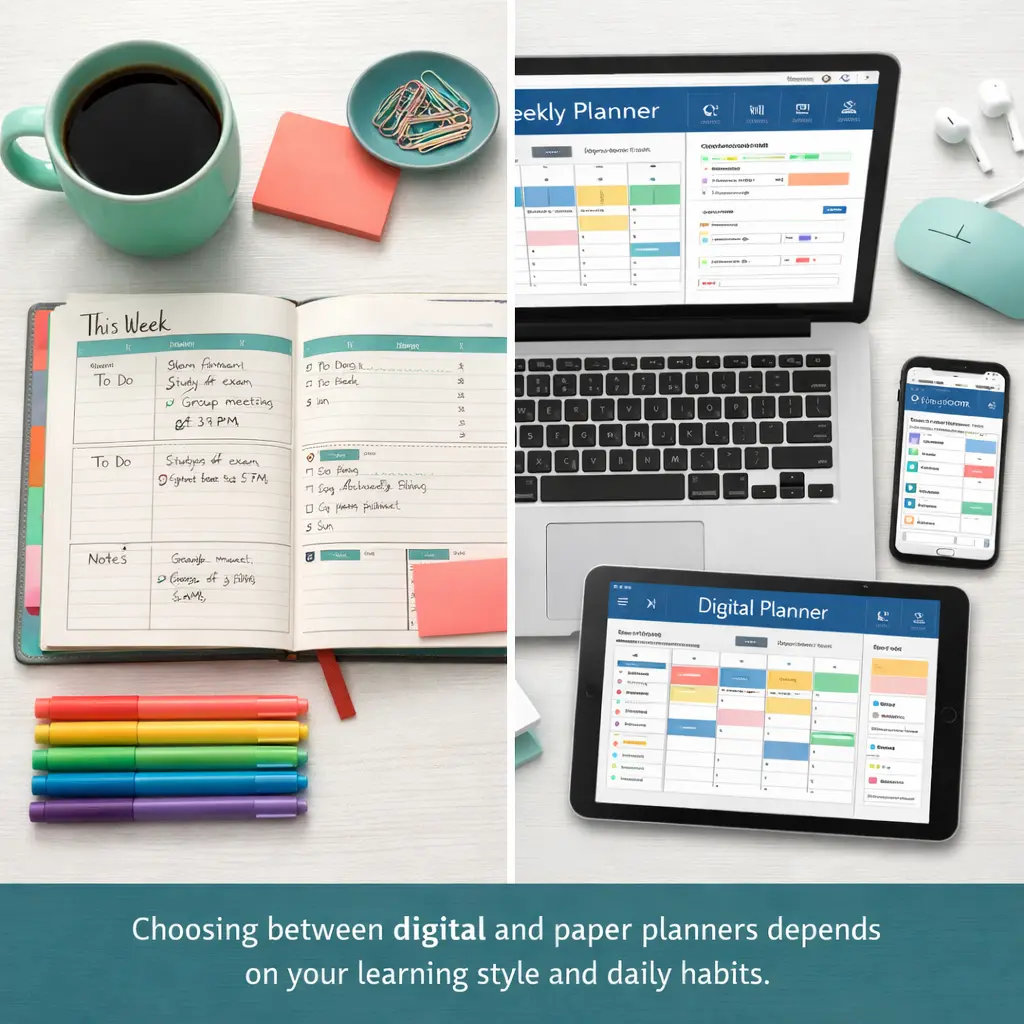
Choosing between digital and paper planners affects how you manage assignments, prepare for exams, and balance academic responsibilities. This decision impacts your daily routine, study effectiveness, and academic success. The best student planners match your learning style, schedule complexity, and budget while actually getting used consistently.
Students waste time and money trying planner systems that don’t fit their needs. Some download apps they never open. Others buy expensive paper planners that gather dust. This comparison examines both formats honestly, covering real advantages and drawbacks to help you select the planning system that works for your unique situation. You’ll learn which planner types excel for different student scenarios, how to test options without commitment, and how successful students combine both formats for maximum effectiveness.
Understanding Student Planner Formats
Student planners fall into two main categories: digital and paper. Each format serves the same core purpose—organizing classes, assignments, exams, and activities—but through fundamentally different approaches.
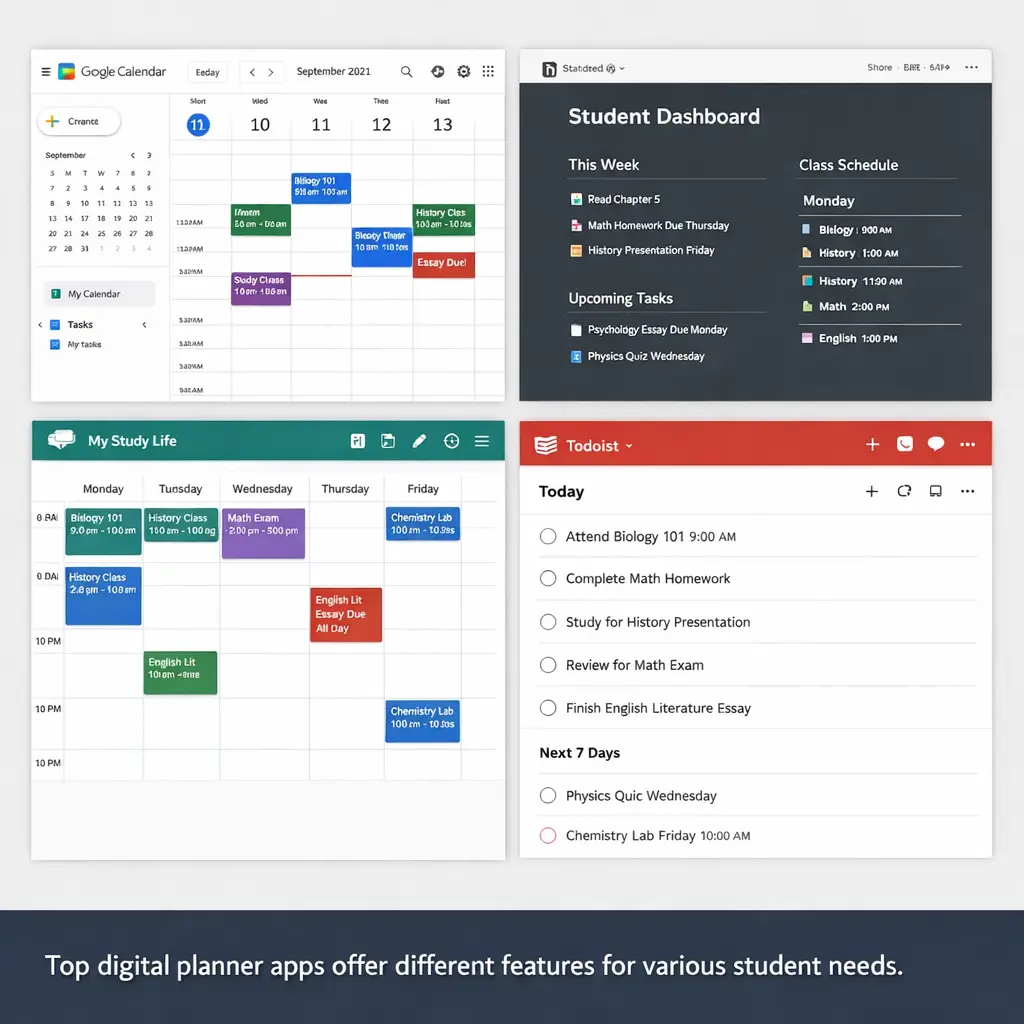
Digital planners are software applications or electronic documents used on phones, tablets, or computers. They range from simple calendar apps to comprehensive academic management systems. Popular examples include Google Calendar, Notion, My Study Life, and digital bullet journal templates used with note-taking apps like GoodNotes.

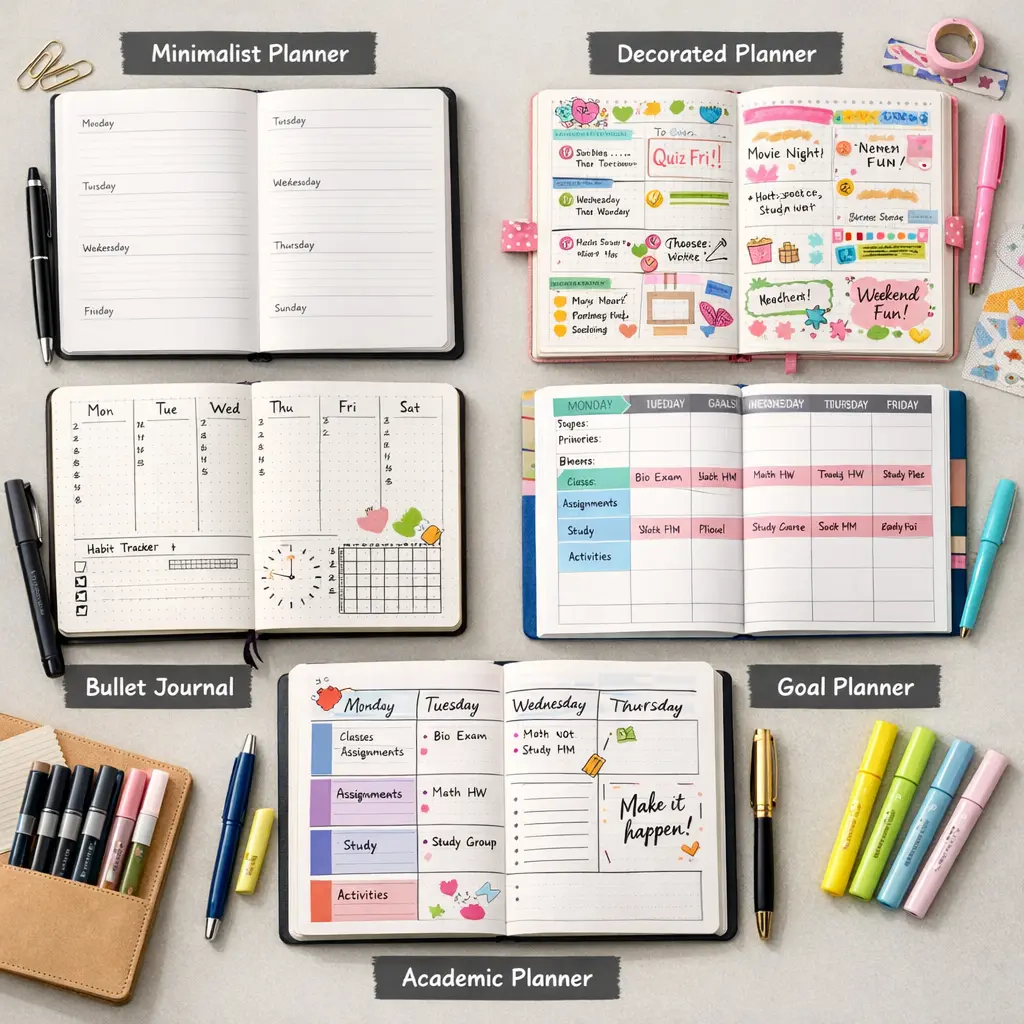
Paper planners are physical books or notebooks with printed calendars, schedule pages, and organization layouts. Options include professionally designed academic planners from brands like Erin Condren and Passion Planner, simple spiral-bound student agendas, and customizable bullet journals.
The format you choose influences how you interact with your schedule daily. Digital planners require device access and battery life. Paper planners need physical space and manual updates. Neither format is objectively superior—effectiveness depends on matching the tool to your habits and needs.
Many students assume they must choose one format exclusively. In reality, hybrid systems combining both digital and paper elements often deliver better results than either format alone.
Digital Planners: Complete Overview
Digital planners leverage technology to automate reminders, sync across devices, and integrate with school systems. They offer features impossible with paper, but require consistent device usage and technical comfort.
Top Digital Planner Apps
Google Calendar remains the most widely used digital planner among students. It’s completely free, syncs across all devices, integrates with Gmail and Google Classroom, and offers color-coding for different classes. The automatic reminder system sends notifications to your phone before assignments are due. Google Calendar works well for students who primarily need schedule tracking and deadline management.
Notion provides comprehensive workspace combining calendars, task lists, databases, and notes in one location. Students create custom academic dashboards tracking classes, assignments, projects, exam dates, and extracurricular commitments. The free education plan includes unlimited features. Notion suits students who want detailed organization and don’t mind spending time setting up custom systems.
My Study Life was designed specifically for students. It tracks class schedules with rotation support, assignment deadlines, exam dates, and revision tasks. The app works offline and syncs when connected. Color-coding helps distinguish subjects. My Study Life works best for high school and undergraduate students with straightforward academic schedules.
Todoist excels at task management with projects, labels, filters, and priority levels. Students organize assignments by class, tag items by type (homework, reading, projects), and set recurring tasks for regular responsibilities. The free version covers basic needs, while premium adds reminders and labels. Todoist fits students who think in terms of tasks rather than calendar blocks.
Microsoft OneNote combines note-taking with planning capabilities. Students create notebook sections for each class, embedding assignment lists, exam countdowns, and schedule tables alongside lecture notes. OneNote syncs across devices and integrates with other Microsoft tools many schools use. This option works well for students who want notes and planning in one location.
GoodNotes and Notability serve iPad users seeking digital versions of paper planners. Students import PDF planner templates and write directly on tablets using Apple Pencil. These apps provide the handwriting benefits of paper planners with digital features like cloud backup, search functionality, and easy reorganization. The approach requires iPad investment but delivers a true hybrid experience.
Digital Planner Features and Benefits
Automatic reminders represent the biggest advantage of digital planners. You set assignment due dates once, and your phone sends notifications hours or days before deadlines. This eliminates the need to check your planner constantly and catches forgotten tasks. Students who struggle with time blindness or frequently lose track of deadlines benefit significantly from automatic alerts.
Cross-device synchronization means your schedule updates everywhere simultaneously. Add an assignment on your laptop during class, and it appears on your phone minutes later. Access your planner from any device with internet connection. This prevents the “left my planner at home” problem that derails paper users.
Integration with school systems saves time and reduces errors. Many digital planners connect with learning management systems like Canvas, Blackboard, or Google Classroom, automatically importing assignment due dates. You spend less time transferring information manually and face lower risk of recording incorrect dates.
Unlimited space allows detailed notes without page constraints. Digital planners never run out of room. Add extensive project notes, attach relevant files, include links to research sources, all without worrying about writing space. This flexibility supports complex assignments and long-term projects.
Easy reorganization lets you move tasks, reschedule events, and restructure plans without messy cross-outs or rewriting. Realized a project needs more time? Drag it to a new date in seconds. Priorities shifted? Reorder your task list instantly. Digital format adapts to changing academic demands smoothly.
Searchability helps locate specific assignments, past deadlines, or class information quickly. Type keywords and find relevant entries across months of data. This beats flipping through weeks of paper pages when trying to remember when a professor mentioned an upcoming requirement.
Cost accessibility makes quality planning tools available to all students. Google Calendar, basic Notion, Todoist free version, and many others deliver solid functionality at zero cost. Students on tight budgets can access professional-grade organization tools without financial barriers.
Digital Planner Limitations
Screen dependency requires charged devices and functioning technology. Dead phone battery means no planner access. Broken tablet equals lost planning capability until repaired. Technical failures disrupt your organization system at the worst possible times. Students who already struggle with device management face additional challenges.
Distraction risk increases when planners live on devices filled with social media, games, and entertainment. Opening your planner to check assignments leads to notification checks, message responses, and accidental 20-minute social media sessions. Digital planners demand stronger self-discipline to avoid getting sidetracked.
Learning curve complexity makes some digital planners intimidating for new users. Notion’s flexibility requires significant setup time and tutorial watching. Advanced features in apps like Todoist take practice to master. Students wanting immediate usability may feel frustrated during initial learning periods.
Limited tactile engagement removes the physical writing process some students need for memory formation. Research shows handwriting activates different brain regions than typing, potentially strengthening information retention. Visual and kinesthetic learners may process information less effectively through digital input.
Synchronization dependency means you need internet connection for updates to reach all devices. Working offline creates temporary silos where changes don’t appear everywhere until reconnection. Cloud service outages or school network problems can temporarily disrupt access to your planning information.
Privacy and data concerns arise when storing academic information on third-party servers. Most apps collect usage data. Some students prefer keeping schedules and assignments in private physical format rather than cloud-stored digital records.
Paper Planners: Complete Overview
Paper planners provide tangible organization through physical writing and visual layout. They offer focus, independence from technology, and proven memory benefits, while requiring manual maintenance and physical carrying.
Top Paper Planner Options
Erin Condren Academic Planner delivers premium quality with colorful layouts, customization options, and durable binding. Monthly and weekly spreads include assignment sections, goal tracking, and note pages. The luxurious design motivates many students to maintain planning habits. Prices range from $35-60 depending on customization. This option suits students who value aesthetics and don’t mind the investment.
Passion Planner combines scheduling with goal-setting frameworks and reflection prompts. Each week includes space for priorities, to-do lists, and personal goals alongside schedule blocks. The academic version aligns with school calendars. Passion Planner costs $28-35 and comes in dated or undated versions. Students focused on holistic development and intentional living appreciate this comprehensive approach.
Blue Sky Academic Planner offers affordable functionality with monthly and weekly views, durable covers, and essential planning features. Prices start around $12-20, making this a budget-friendly option. Simple layouts work well for students who want straightforward organization without elaborate designs or goal-setting frameworks.
Panda Planner incorporates productivity science with sections for priorities, schedules, end-of-day reviews, and gratitude practices. The structured approach helps students with ADHD or executive function challenges. Academic versions include assignment tracking and exam countdown. Priced at $25-30, Panda Planner fits students seeking guided planning routines.
Bullet Journal represents the fully customizable option. Students create their own layouts in blank or dotted notebooks, designing spreads that match exact needs. This method requires more time investment but delivers perfect personalization. Notebook costs range from $5 basic options to $20+ for quality brands like Leuchtturm1917. Bullet journaling suits creative students who enjoy design and want complete control over their planning system.
Simple Academic Agenda refers to basic school-provided or store-bought planners with calendar grids and assignment spaces. These cost $5-15 and deliver functional organization without frills. Many students find simple formats perfectly adequate for tracking classes, due dates, and activities without overwhelming features.
Paper Planner Features and Benefits
Enhanced memory retention occurs through the physical act of handwriting. Studies indicate writing information by hand activates neural pathways in ways typing does not, strengthening memory formation. Students who write assignment due dates often remember them better than those who type them into apps. This cognitive advantage particularly benefits visual and kinesthetic learners.
Focused interaction eliminates digital distractions. Opening a paper planner means planning, period. No notifications appear. No social media tempts you. No messages interrupt. This focused environment helps students with attention challenges complete planning tasks more effectively.
Visual overview allows seeing entire weeks or months at a glance without scrolling, clicking, or zooming. Flip open to a two-page spread showing your full week. The spatial arrangement helps many students conceptualize time and workload better than screen-based views.
Creative customization enables personal expression through colors, stickers, drawings, and handwriting styles. This creative element makes planning more enjoyable for many students, increasing consistency. The aesthetic satisfaction of beautiful spreads motivates regular engagement with the planning system.
No technology requirements mean paper planners work anywhere, anytime, without charging, Wi-Fi, or working devices. Battery death doesn’t affect access. Internet outages don’t matter. Technical troubleshooting never disrupts your planning routine. This reliability particularly benefits students in areas with connectivity challenges.
Privacy assurance keeps your schedule, assignments, and personal notes in physical form only you can access. No data collection, no cloud storage, no terms of service agreements. Students concerned about digital privacy appreciate this complete control.
Reduced screen time provides a break from the constant device usage defining modern student life. Classes use computers, socializing happens on phones, entertainment streams on tablets. A paper planner offers respite from screens while still supporting productivity. This break benefits students experiencing digital fatigue or eye strain.
Paper Planner Limitations
Manual updates require writing the same recurring information repeatedly. That Monday morning chemistry class needs manual entry every single week. Regular assignments must be written out each time. Rescheduled commitments mean crossing out and rewriting. The manual labor takes more time than digital copy-paste or recurring event features.
No automatic reminders place responsibility entirely on you to check your planner. Forgot to look at your planner today? You might miss deadlines. Paper planners depend on building consistent check-in habits without technological prompting. Students who struggle with routine-building may find this challenging.
Physical portability requirements mean remembering to bring your planner everywhere. Left it in your dorm room during afternoon classes? You can’t check when that assignment is due. Paper planners create a single point of failure—forget the physical book and lose all planning access until retrieval.
Limited space constraints restrict how much you can write in daily boxes or weekly sections. Complex projects with extensive notes might not fit in the allocated space. You either squeeze in tiny handwriting, use abbreviations, or reference separate notes elsewhere. Digital planners never run out of writing room.
Permanent mistakes require crossing out, covering with correction tape, or living with errors. Accidentally wrote an assignment on the wrong date? Cross it out and rewrite. The visual clutter from corrections bothers many students and can make planners harder to read over time.
Replacement costs add up as semesters progress. Most dated planners last one academic year before becoming obsolete. Annual replacement means ongoing expenses, whereas digital planners typically operate on one-time purchase or free models. Budget-conscious students must factor in recurring costs.
Sustainability concerns arise from paper production, shipping, and eventual disposal. While many brands now use recycled materials and environmentally responsible practices, paper planners inherently use more physical resources than digital alternatives. Environmentally focused students may struggle with this impact.
Head-to-Head Comparison
Direct comparison across key dimensions reveals where each format excels and falls short, helping you weigh factors most important to your situation.
Organization and Functionality
Digital planners provide superior functionality for complex schedules. Color-code eight different classes, set multiple reminders per assignment, create subtasks for projects, link to relevant files, attach syllabi—all standard features. The organizational depth supports students managing intensive academic loads with research projects, group work coordination, and extracurricular leadership.
Recurring events work brilliantly in digital format. Set your class schedule once at semester start, and it automatically populates every week. Regular club meetings, study group sessions, and work shifts appear without manual rewriting. This automation saves hours across a semester.
Task dependencies and project management shine digitally. Break research papers into stages (topic selection, source gathering, outline, draft, revision), set deadlines for each stage, and track progress. Many apps show completion percentages and highlight overdue items automatically.
Paper planners excel at simple, visual organization. Write your classes, assignments, and activities in clear layouts you design or choose. The two-page week spread lets you see Monday through Sunday simultaneously, making patterns obvious. Monthly calendar views show the entire month without clicking through different screens.
Custom categorization works beautifully on paper through icons, colors, or highlighting systems you create. Draw stars next to priority assignments. Highlight exam dates in yellow. Add arrows for flexible-timing tasks. The visual language you develop makes information instantly recognizable.
Quick capture happens faster on paper for many students. Scribbling a due date announced during class takes seconds. Opening an app, finding the right date, and typing the same information requires more steps. When speed matters during rapid-fire lecture information, paper wins.
Winner varies by complexity: Digital handles complex schedules better; paper serves straightforward organization more simply.
Accessibility and Portability
Digital planners go everywhere your phone goes. Phones live in pockets, purses, and hands throughout the day. This constant access means checking schedules during lunch, between classes, or while waiting for appointments takes seconds. Cross-device sync extends accessibility—update on your laptop, check on your phone, reference on your tablet.
Cloud storage provides disaster recovery. Dropped your phone in water? Your planning data exists safely in the cloud, accessible from any other device. Lost your tablet? Sign in on a new device and everything reappears. This backup protection prevents total information loss from single device failure.
Physical accessibility features help students with disabilities. Screen readers support vision impairment. Voice input assists students with motor difficulties. Adjustable text sizes help reading challenges. Reminder sounds aid students with attention differences. Digital format offers accessibility options paper cannot match.
Paper planners require remembering to bring the physical book. Forgot your planner at home? You’re without planning access all day. Left it in your locker? Extra trip needed. The single physical object creates dependency on remembering to carry it, adding mental load to already busy student life.
Size matters with paper. Compact planners fit in bags easily but offer less writing space. Full-size planners provide generous layouts but feel bulky to carry. The physical weight and volume factor into daily decisions about what to bring to campus.
Accessibility limitations affect some students significantly. Dyslexia makes small printed text difficult to read. Motor challenges make writing painful or slow. Vision impairment renders standard paper planners nearly useless without magnification. Paper format offers fewer accommodation options for diverse needs.
Winner: Digital for accessibility and backup; tied for daily portability (phones vs. forgetting physical planners).
Cost Analysis
Digital planners range from completely free to moderate subscription costs.
Free options include:
- Google Calendar (full functionality, unlimited use)
- Notion (free education plan with nearly all features)
- Apple Calendar (pre-installed on Apple devices)
- Todoist Basic (sufficient for many students)
- Microsoft OneNote (free with account)
Premium subscriptions typically cost:
- Notion paid plans: $4-8/month (rarely necessary for students)
- Todoist Premium: $4/month
- Fantastical: $5/month
- Specialized student apps: $0-30/year
One-time purchases for tablet planner apps:
- GoodNotes: $8 one-time
- Notability: $15 one-time
- Plus PDF planner templates: $5-30 one-time
Initial device investment represents the major cost barrier. Students without smartphones, tablets, or computers face purchasing devices for digital planning. However, most students already own suitable devices for other purposes, making marginal planning cost near zero.
Paper planners involve annual replacement and supply costs.
Common price ranges:
- Basic academic agendas: $5-15
- Mid-range planners (Blue Sky, simplified designs): $15-25
- Premium planners (Erin Condren, Passion Planner): $25-60
- Bullet journal supplies: $5-30 depending on quality
- Accessories (pens, highlighters, stickers): $10-50 optional
Annual replacement creates recurring expense. Each academic year requires a new planner since dates become obsolete. Over four undergraduate years, even budget planners ($15/year) total $60, matching or exceeding many digital options.
Hidden costs include:
- Replacement when lost ($15-60 immediate expense)
- Multiple planners if first choice doesn’t work ($15+ per attempt)
- Supplies needing replenishment (pens, correction tape)
Winner: Digital for long-term cost, especially free options; paper competitive for first-year trial at basic price points.
Learning and Memory Impact
Paper planners demonstrate clear advantages for memory retention and information processing.
Research on handwriting versus typing shows handwriting activates more brain regions, particularly areas associated with memory formation. When you write “Chapter 5 essay due Friday” by hand, your brain processes that information differently than typing the same words. Many students report better deadline recall with handwritten entries.
The slower pace of handwriting allows processing time. Typing happens quickly, sometimes without full mental engagement. Writing by hand forces you to stay with the information longer, creating deeper encoding. This matters when transferring syllabi information or lecture-mentioned due dates into your planning system.
Visual memory benefits from custom layouts and handwriting recognition. Your brain remembers that the calculus exam appears in the bottom right corner of the page, written in blue ink with two exclamation marks. These spatial and visual cues aid recall. Digital entries in uniform fonts and standardized layouts lack these distinctive memory hooks.
Kinesthetic learning activates through physical writing. Students who learn well through movement and touch engage more fully with paper planners. The sensory experience of pen on paper, turning pages, and placing stickers creates multi-modal learning opportunities.
Digital planners offer compensating advantages for learning and organization.
External reminders reduce memory burden. You don’t need to remember assignment due dates because your phone will remind you. This frees cognitive resources for actual learning rather than deadline tracking. Students can focus on understanding material rather than memorizing when tasks are due.
Linked resources support deeper learning. Attach syllabi PDFs to calendar entries. Link assignment descriptions to relevant course websites. Connect project deadlines to shared Google Docs. This integration keeps learning resources connected to scheduling, supporting better preparation.
Search functionality aids studying. Looking for when you covered specific topics? Search your planner entries and notes for keywords. Reviewing semester progression for exam preparation becomes easier when you can search rather than manually reviewing weeks of paper pages.
Winner: Paper for memory formation and information retention; digital for reducing memory burden and resource integration.
Customization and Flexibility
Paper planners provide superior creative customization and personal expression.
Layout control reaches maximum with bullet journaling. Design daily spreads exactly as you want. Create weekly layouts matching your thinking patterns. Add monthly habit trackers, goal pages, brain dump sections, and reflection prompts. Every page reflects your personal needs and aesthetic preferences.
Visual personalization through color, drawing, and decoration makes planning enjoyable. Students who love creative expression turn planning into an art form. Color-coded classes, decorative headers, motivational quotes, and thematic monthly spreads transform planning from chore to hobby.
Method flexibility allows combining approaches. Use elements from different productivity systems—time blocking from one method, rapid logging from another, reflection questions from a third. Paper format imposes no structural requirements.
Physical additions include pockets for handouts, bookmark ribbons, attached pen loops, and sticky notes. You can literally tape or glue items into your planner, creating a comprehensive academic life document.
Digital planners excel at functional customization and format flexibility.
Template variety in apps like Notion means creating custom dashboards with exact data fields and views you want. Build class databases with fields for professor names, office hours, syllabus links, and grade weights. Design project trackers showing progress percentages and deadline countdowns.
View switching provides multiple perspectives on the same data. See your week as a list, calendar grid, or timeline. View your month as events only, tasks only, or combined. Switch between perspectives based on current needs without maintaining multiple planning systems.
Automation creates dynamic responses to changes. Set a task to repeat every Monday, and it appears automatically forever. Mark an assignment complete, and it disappears from today’s list while remaining in archive. Reschedule an event, and related items can shift automatically.
Integration with other tools extends functionality. Connect your planner with note apps, habit trackers, fitness apps, and productivity tools. Build a comprehensive productivity ecosystem rather than isolated planning.
Winner: Paper for creative customization; digital for functional customization and automation.
Environmental Considerations
Digital planners reduce paper consumption, shipping emissions, and physical waste. One phone running a calendar app replaces years of paper planners, multiple pens, and shipping boxes. For students prioritizing environmental impact, digital solutions minimize direct resource use.
The environmental cost shifts to device manufacturing and energy use. Smartphones require mining rare earth minerals, energy-intensive manufacturing, and eventual electronic waste disposal. However, students typically own phones regardless of planning method, making marginal environmental impact of planning apps minimal.
Cloud storage and servers consume energy. Every sync of your calendar, every backup of your tasks, uses electricity powering data centers. The cumulative environmental impact of internet infrastructure supporting digital planning is real but shared across billions of users.
Paper planners consume trees, water, and energy in manufacturing. Even recycled-paper planners require processing resources. Shipping physical books from manufacturers to warehouses to stores to students adds transportation emissions.
Disposal creates waste at year-end. Most students discard old planners after the academic year, adding to landfills. While paper biodegrades better than electronics, the annual disposal cycle of millions of student planners represents significant waste.
Sustainable options exist within paper planning. Brands using recycled paper, eco-friendly inks, and carbon-neutral shipping reduce impact. Reusable planning systems with replaceable page inserts minimize annual waste. Students can choose environmentally responsible paper options.
The personal sustainability equation includes considering existing resources. Using a smartphone you already own for planning adds minimal environmental impact. Buying a new tablet specifically for digital planning carries substantial environmental cost. Similarly, using simple paper planners has less impact than premium imported luxury planners.
Winner: Digital when using existing devices; depends on consumption patterns for new purchases.
Best Student Planners by Student Type
Different student situations benefit from different planning approaches. Match your circumstances to these recommendations for better starting points.
High School Students
Best overall approach: Simple paper planner or basic digital app
High school schedules follow predictable patterns—same classes daily or on rotating schedules, homework due the next class period, tests announced a week ahead. This straightforward structure doesn’t require complex planning systems.
Top digital option: My Study Life or Google Calendar
My Study Life was designed for high school schedules with rotating class periods and simple assignment tracking. Google Calendar works well for students already using Gmail or Google Classroom for schoolwork.
Top paper option: Simple academic agenda or Blue Sky planner
Basic school-provided agendas cover essential needs at minimal cost. Blue Sky offers affordable step-up with better organization and durability.
Special consideration: Many high schools restrict phone use during class, making paper planners more practical for writing down assignments when announced. Digital planners work better for students with strong after-school homework routines.
College Undergraduates
Best overall approach: Hybrid system (digital calendar + paper notes) or comprehensive digital app
College schedules grow more complex with classes scattered across the week, long-term projects with multiple deadlines, extracurricular leadership, social commitments, and possibly work schedules. This complexity benefits from digital automation.
Top digital option: Notion or Google Calendar + Todoist combination
Notion provides comprehensive workspace for complex tracking. Google Calendar combined with Todoist delivers robust free planning separating time-based scheduling from task management.
Top paper option: Passion Planner or Erin Condren Academic Planner
College students who prefer paper benefit from planners including goal-setting, habit tracking, and monthly overview features supporting longer-term planning.
Special consideration: Learning management systems (Canvas, Blackboard) already contain assignment due dates. Digital planners integrating with these systems eliminate duplicate entry and reduce errors.
Graduate Students
Best overall approach: Digital planner with project management capabilities
Graduate work centers on long-term research, complex projects, conference deadlines, teaching responsibilities, and dissertation stages. Robust digital tools handle this complexity better than paper.
Top digital option: Notion, Todoist Premium, or Microsoft OneNote
Comprehensive project management, reference organization, and multi-year timeline tracking become essential. These platforms support professional-level planning graduate work requires.
Top paper option: Bullet journal or premium goal-focused planner
Graduate students choosing paper typically need maximum customization for unique program requirements. Bullet journals adapt to specialized needs like research stage tracking or dissertation chapter progress.
Special consideration: Graduate programs often span multiple years without clear semester breaks. Digital planners’ unlimited timeline support and easy reorganization accommodate long-term project evolution better than annually dated paper planners.
Working Students
Best overall approach: Digital planner with calendar integration and reminders
Balancing work shifts, class schedules, study time, and personal commitments requires automatic reminders and easily accessible planning. Digital tools prevent scheduling conflicts and keep both school and work obligations visible.
Top digital option: Google Calendar or Outlook (if work uses Microsoft)
Using the same digital platform for work and school schedules prevents double-booking and shows full availability. Integration with work calendar systems already in use reduces system-switching.
Top paper option: Hourly layout planner like Passion Planner
Working students who prefer paper need hourly time-blocking to fit studying around work shifts. Planners with hourly segments from early morning to late evening accommodate complex scheduling.
Special consideration: Work schedules change frequently in many student jobs. Digital planners make adjusting multiple commitments when shifts change much easier than rewriting paper planner pages.
Students with ADHD or Learning Differences
Best overall approach: Structured digital planner with strong reminder systems OR highly visual paper planner
Executive function challenges benefit from external reminder systems and visual organization. The ideal format depends on individual needs and device relationship.
Top digital option: Structured apps like Panda Planner (digital version), Todoist with recurring tasks, or Goblin Tools
ADHD-friendly digital planners provide multiple daily reminders, break tasks into small steps automatically, and maintain consistency in format. Visual apps with progress bars and completion checkmarks provide satisfying feedback.
Top paper option: Panda Planner, visual bullet journal, or highly structured daily planners
Physical planners with clear routines, daily reflection sections, and consistent formats support ADHD planning needs. Bold visual layouts with color-coding help maintain attention. The tactile interaction keeps some students engaged better than screens.
Special consideration: Time blindness benefits enormously from automatic reminders digital planners provide. However, some ADHD students find screens too distracting. Test both approaches to discover which compensates better for your specific challenges.
Hybrid Planning Systems
Combining digital and paper planners captures advantages of both formats while minimizing individual weaknesses. Many successful students discover hybrid approaches work better than exclusive use of either format.
Effective Hybrid Combinations
Digital calendar + Paper task/study planner represents the most common successful hybrid. Use Google Calendar or similar for scheduling classes, appointments, and deadline dates. Rely on paper planner for daily to-do lists, study session planning, and detailed project notes.
This combination provides automatic reminders for time-based commitments while maintaining handwriting benefits for learning-related planning. You won’t miss appointments thanks to digital alerts, but you process assignment details more deeply through handwritten planning.
Digital master system + Paper daily pages works well for comprehensive thinkers. Maintain complete information digitally where it’s searchable and backed up. Each morning, write today’s priorities and schedule on a single paper page. This approach combines digital accessibility with paper’s focus benefits.
The morning planning ritual helps you start days intentionally. The single-page constraint forces priority decisions. At day’s end, you update digital records with any changes, maintaining a comprehensive archive while using paper for active daily work.
Paper planner + Digital reminders suits students who prefer paper’s creative satisfaction but struggle with remembering to check planners. Write assignments and schedules in paper planner, then add deadline reminders to phone calendar.
This duplicates some entry effort but captures paper’s memory benefits while adding digital’s reminder safety net. You’re not relying on paper alone for deadline tracking but still gaining handwriting advantages.
Bullet journal + Digital calendar sync appeals to creative students in complex schedules. Design beautiful custom spreads in bullet journal for weekly planning and reflection. Mirror time-specific commitments in digital calendar for cross-device access and reminders.
The bullet journal remains your primary planning interaction and creativity outlet. Digital calendar functions as backup accessibility and reminder system, plus provides schedule information during times you don’t have your journal.
Making Hybrid Systems Work
Establish clear role division. Define which information lives where. Confusion about whether you recorded something digitally or on paper creates missed tasks. Clear rules like “appointments digital, study tasks paper” prevent overlap confusion.
Create simple sync routines. Hybrid systems require transferring information between formats. Set specific times daily—perhaps morning coffee and post-dinner—for ensuring both systems contain current information. Five-minute sync routines prevent systems diverging.
Accept strategic duplication. Some information benefits from appearing in both places. Important exam dates or major project deadlines work well recorded digitally (for reminders) and on paper (for visual awareness). Strategic intentional duplication differs from confused accidental duplication.
Use each format’s strengths. Route information to the format handling it best. Auto-populated class schedules suit digital. Project brainstorming benefits from paper sketching. Collaborative group project coordination works better digitally. Reflection and goal-setting flourish on paper.
Keep systems minimal. Hybrid approaches can become overcomplicated with too many tools. Limit yourself to one digital platform and one paper format. Additional tools add complexity that reduces actual usage.
How to Choose Your Best Student Planner
Select a planner matching your actual habits and needs rather than idealized versions of how you wish you worked.
Decision Framework
Start with these questions:
How do you naturally interact with information?
- If you remember things better when you write them: lean paper
- If you forget things without external reminders: lean digital
- If you think visually and spatially: consider paper
- If you work across multiple devices constantly: consider digital
What is your schedule complexity?
- Simple class schedule with homework: simple digital or paper works
- Complex schedule with work, activities, variable commitments: digital handles better
- Long-term research projects and dissertation stages: digital project management
- Primarily short-term repeating tasks: paper suffices
What’s your relationship with technology?
- Already live on phone and apps: digital integration is natural
- Appreciate breaks from screens: paper provides respite
- Frequently have dead batteries or tech issues: paper reliability helps
- Uncomfortable with apps and software: simple paper reduces friction
What’s your budget?
- Zero dollars available: free digital options or borrowed notebook
- $15-30 to invest: quality paper planner or premium app
- Willing to spend on productivity: either format has excellent options
Do you have specific learning needs?
- ADHD requiring external reminders: digital alerts help significantly
- Dyslexia or reading challenges: digital with adjustable text or simple visual paper
- Memory formation focus: paper handwriting benefits
- Physical writing difficulties: digital reduces strain
Testing Approaches
Try before committing. Don’t buy a $60 planner or annual app subscription immediately.
For digital testing: Use free versions of apps for 2-3 weeks. Google Calendar, Notion free plan, and basic Todoist cost nothing and demonstrate whether digital planning fits your style. Set up with current semester information and genuinely use for daily planning.
For paper testing: Buy an inexpensive basic planner ($5-15) or use a simple notebook as a bullet journal trial. Three weeks of genuine use reveals whether you maintain paper planning habits. If the trial succeeds, upgrade to higher-quality options next semester.
Trial timing matters. Starting new systems during intense exam periods sets up failure. Begin trials at semester start, after spring break, or during lighter academic weeks when you can establish habits without crisis pressure.
Red Flags to Notice
You never open the app. If you tried digital planning for three weeks but rarely check your planner app, digital likely doesn’t fit your workflow. Switch to paper or hybrid.
Your paper planner stays in your backpack. Bought a planner but it never comes out except to write new assignments? Paper planning isn’t working. Try digital or examine what’s preventing paper use.
You’re maintaining three systems. Using Google Calendar AND Notion AND a paper planner AND sticky notes means your system is too complex. Simplify to one or two tools maximum.
You spend more time decorating than planning. If planning sessions involve 45 minutes of artistic layout design but 5 minutes of actual scheduling, your planner became a hobby rather than a tool. Either embrace planning-as-creative-outlet or simplify to functional-only systems.
You bought multiple planners this semester. Switching planners monthly means you’re chasing perfect systems rather than building habits with good-enough tools. Commit to one approach for at least one full semester.
Making Your Planner Work: Implementation Tips
Owning a planner differs completely from using a planner effectively. Implementation determines success regardless of format.
Building the Planning Habit
Connect planning to existing routines. Don’t rely on remembering to plan at random times. Attach planning to something you already do daily. Morning coffee becomes planning time. Evening phone charging includes planner check. Transition between last class and heading home includes tomorrow planning.
Start minimal. Don’t try implementing elaborate time-blocking, goal-tracking, habit-monitoring systems immediately. Begin with basic functionality: record assignments and check your planner twice daily. Add complexity only after basic habits solidify.
Set specific planning times. “Plan regularly” fails. “Review planner every day at 8:00 AM and 4:00 PM” succeeds. Specific times create automatic triggers rather than requiring constant decision-making about when to plan.
Make your planner visible. Digital planners should widget on phone home screens. Paper planners belong on desks, not in drawers. Planning tools you see get used. Tools you must retrieve from storage get forgotten.
Use planning time intentionally. Five focused minutes planning beats 20 minutes of half-distracted planning while watching videos. Close other apps, put aside your phone, and concentrate specifically on planning during planning time.
Effective Planning Practices
Write assignments immediately. Don’t trust your memory to record assignments later. When professors announce due dates, write them immediately—in class during the announcement if possible, immediately after class if phone use isn’t allowed.
Plan tomorrow today. Don’t wait until morning to discover what today requires. Spend five minutes each evening reviewing tomorrow’s schedule and identifying priorities. Morning planning often gets skipped during rushed mornings.
Include time estimates. Don’t just list “read chapter 7.” Write “read chapter 7 (60 min).” Time estimates reveal whether your planned day is realistic or impossibly overloaded. This prevents planning 8 hours of work into a 3-hour afternoon.
Schedule specific study times. “Study biology” works less effectively than “biology chapter 4 review, 2:00-3:30 PM, library third floor.” Specific times and locations increase follow-through significantly.
Review weekly. Daily planning manages immediate tasks. Weekly review on Sunday evenings or Monday mornings identifies upcoming busy periods, major deadlines, and priorities for the week. This prevents surprises and enables planning around challenging weeks.
Reflect on what works. Spend five minutes monthly noticing what planning practices you’re actually doing and which you’re skipping. Double down on practices you maintain naturally. Modify or eliminate practices you consistently avoid.
Adaptation Strategies
Adjust for different classes. Math homework due next class needs daily tracking. Research papers need multi-week project management. Reading courses need weekly page-count tracking. Customize your planning detail level to class requirements rather than treating all classes identically.
Plan lighter during high-stress periods. When midterms or finals approach, strip planning to essentials only. Complex systems you maintained during normal weeks become burdens during crisis times. Simplified temporary planning keeps you functional when overwhelmed.
Embrace imperfection. Missed writing down an assignment? Add it when you remember. Skipped checking planner yesterday? Check it today. Perfect planning consistency is impossible. Recovering from planning lapses matters more than maintaining flawless records.
Evaluate semester-end. Each semester end, assess what planning practices helped most and which proved useless. Carry successful practices to next semester. Drop practices that created work without delivering value. Your planning system should evolve based on real results.
Common Planning Mistakes to Avoid
Recognizing planning pitfalls helps you avoid wasting time and money on approaches doomed to fail.
Overcomplication
The mistake: Implementing elaborate systems with extensive time-blocking, multiple tracking spreadsheets, color-coding with 12 categories, habit trackers for 20 habits, reflection questions, and weekly reviews requiring 90 minutes.
Why it fails: Complex systems require substantial maintenance time. Initial motivation carries you through setup, but maintaining complexity weekly becomes exhausting. Most students abandon overcomplicated systems within a month.
The solution: Start with bare minimum—classes, assignment due dates, and exam dates. Add one additional element only after the minimum becomes habitual. Build slowly toward complexity rather than starting there.
System Hopping
The mistake: Trying new planning systems every 2-3 weeks. Started with Google Calendar, switched to Notion after two weeks, tried bullet journaling week four, downloaded My Study Life week six, bought an Erin Condren planner week eight.
Why it fails: Planning systems require time to become habitual. Switching constantly means perpetually learning new systems rather than benefiting from established routines. You’re always a beginner, never developing mastery.
The solution: Commit to one approach for a full semester minimum. Systems reveal their value after weeks of use, not days. The best planning system is the adequate one you actually use consistently.
Planning Without Action
The mistake: Spending extensive time creating beautiful planner spreads, perfect digital dashboards, and detailed schedules—then not following them. Planning becomes an end itself rather than a tool for action.
Why it fails: Planning should support doing, not replace doing. Hours spent on elaborate planning systems subtract from hours available for actual studying, assignment completion, and learning.
The solution: Limit planning time strictly. Ten minutes daily maximum for planning activities. If you spend more time planning than doing, your planning is now your procrastination method.
No Routine Check-Ins
The mistake: Writing assignments in your planner but never checking what you wrote. The planner contains complete information that you never reference, leading to missed deadlines despite planning.
Why it fails: Information in an unchecked planner doesn’t enter your working awareness. Digital planners without reminders enabled function like paper planners left in bags—useless despite containing accurate information.
The solution: Set non-negotiable planner check times. Morning review shows today’s commitments. Evening review prepares tomorrow. These two brief check-ins ensure planning information actually guides your actions.
Perfectionism Paralysis
The mistake: Refusing to write in your beautiful planner with non-perfect handwriting, avoiding setting up digital systems until you understand all features, delaying planning start until finding the “perfect” system.
Why it fails: Perfect planning systems don’t exist. Every approach includes trade-offs. Waiting for perfection means planning never begins, leaving you with no organization system at all.
The solution: Start with good enough immediately. Messy handwriting in a planner beats perfect handwriting in no planner. A simple Google Calendar used daily beats elaborate unused Notion workspace. Begin now with available tools.
Ignoring Your Actual Style
The mistake: Using paper planners because they look aesthetic on social media despite never maintaining handwritten systems. Forcing digital because it seems more organized despite preferring physical writing.
Why it fails: Planning systems must match your natural working style. Fighting against your preferences requires constant willpower that eventually exhausts. Sustainable systems align with how you naturally work.
The solution: Be honest about your actual habits, not idealized versions. Hate opening apps? Digital won’t work. Never carry physical items? Paper will fail. Choose systems fitting who you actually are.
No Flexibility
The mistake: Creating rigid planning systems that break when life happens. Missing one day of planning leads to abandoning the entire system. An unplanned commitment ruins your perfect schedule so you stop planning altogether.
Why it fails: Student life is inherently unpredictable. Surprise assignments, illness, family emergencies, and spontaneous opportunities happen constantly. Rigid systems shatter when reality diverges from plans.
The solution: Build flexibility into your approach. Leave buffer time daily. Accept that plans change. View your planner as a guide, not a law. When plans derail, adjust and continue rather than abandoning the system entirely.
Frequently Asked Questions
Are digital or paper planners better for students?
Neither digital nor paper planners are universally better—effectiveness depends on your learning style, schedule complexity, and personal habits. Digital planners excel for students needing automatic reminders, managing complex schedules, and wanting cross-device access. They’re ideal if you already use technology constantly and struggle with remembering deadlines. Paper planners work better for students who retain information better through handwriting, prefer reduced screen time, and have straightforward schedules. Research shows handwriting enhances memory formation, making paper beneficial for learning-focused planning. Many successful students use both formats together: digital calendars for scheduling and reminders, paper planners for study planning and reflection.
What is the best free digital planner for students?
Google Calendar ranks as the best completely free digital planner for most students. It provides unlimited calendar space, automatic syncing across all devices, integration with Gmail and Google Classroom, color-coding for different classes, and reliable reminder notifications. The clean interface requires minimal learning time, and nearly all students already have Google accounts through school. For students wanting more comprehensive features beyond simple scheduling, Notion’s free education plan offers advanced organization with databases, task lists, and custom dashboards for tracking assignments, projects, and goals. My Study Life provides another excellent free option designed specifically for student schedules, including class rotation support, assignment tracking, and exam countdown features.
Do paper planners actually help with memory and studying?
Yes, research demonstrates that handwriting in paper planners supports better memory retention compared to typing. Writing by hand activates different neural pathways than keyboard typing, particularly engaging brain regions associated with memory formation and information processing. When you write assignment due dates, project details, or study goals by hand, your brain spends more time processing that information, creating stronger memory encoding. The slower pace of handwriting compared to typing allows deeper cognitive engagement with the material. Additionally, the visual and spatial aspects of paper planners—remembering that an important exam appears in the bottom corner of the page in blue ink—create memory cues that uniform digital text lacks. However, these memory benefits only matter if you consistently use and review your paper planner.
How much should students spend on a planner?
Students can succeed with planners ranging from free to about $30, with diminishing returns on more expensive options. Free digital planners like Google Calendar provide excellent functionality without any cost. Budget paper planners from $5-15 offer perfectly adequate organization for most students. Mid-range planners from $15-30 add better paper quality, more thoughtful layouts, and durable binding that justifies the cost for students who maintain planning habits. Premium planners above $30 deliver mainly aesthetic improvements rather than functional advantages—they’re worthwhile only if beautiful design genuinely increases your motivation to plan consistently. Start with free or budget options for your first semester of planning. If you maintain consistent planning habits for a full semester, consider upgrading to higher-quality options afterward as a reward and motivation for continued use.
Can I switch from digital to paper planners mid-semester?
Yes, you can switch planner formats mid-semester, though transitions work smoothest during natural academic breaks like spring break or after midterm exams. To switch successfully, set up your new planner format completely before abandoning the old one—transfer all upcoming assignments, exam dates, and commitments to the new system. For one week, maintain both systems simultaneously to ensure nothing gets lost in transition. Choose a light academic week if possible since managing two planners temporarily adds work. After confirming the new planner contains complete information, fully commit to it and stop maintaining the old format. Many students switch from digital to paper seeking better memory retention, or from paper to digital after repeatedly forgetting to check their physical planners. The best planning format is simply the one you’ll actually use consistently.
What planner features are most important for college students?
The most important planner features for college students include monthly overview pages for seeing long-term deadlines and exam dates, weekly spreads with enough space for multiple classes and assignments per day, and dedicated sections for semester goals and project tracking. Time-block layouts help students scheduling complex commitments including classes, work, study sessions, and activities. For digital planners, automatic reminder functionality becomes essential since college students manage more independent responsibilities without parental prompting. Integration with learning management systems like Canvas or Blackboard saves time and prevents transcription errors. Color-coding capability helps distinguish between different courses and commitment types at a glance. Goal-setting spaces support tracking academic objectives and personal development. Portability matters significantly—planners must be small enough to carry daily or accessible on devices you always have.
Are bullet journals good for students or too time-consuming?
Bullet journals work excellently for some students but prove too time-consuming for others—success depends on whether you enjoy creative planning processes. Students who find planning enjoyable, appreciate artistic expression, and view their planning time as relaxing hobby maintain bullet journals successfully. The customization allows perfect adaptation to unique academic needs, and the creative element provides stress relief during intense semesters. However, bullet journals require significant setup time and ongoing maintenance. Students who view planning purely as functional necessity often abandon bullet journals within weeks because the required creative input feels burdensome. The middle ground involves simplified bullet journaling—using basic rapid logging and simple layouts without elaborate artistic spreads. Test basic bullet journaling in an inexpensive notebook before investing in premium supplies. If you genuinely enjoy the process after three weeks, continue. If it feels like a chore, switch to structured pre-made planners requiring less creative energy.
How do I remember to actually check my planner daily?
Remembering to check your planner daily requires connecting planner review to established routines and making your planner unavoidably visible. For digital planners, enable home screen widgets showing today’s schedule and upcoming tasks so you see planning information when checking your phone for any reason. Set two daily reminder alarms specifically for planner review—8:00 AM for morning planning and 8:00 PM for next-day preview work well for most students. For paper planners, keep your planner open on your desk rather than closed in a drawer or bag. Place it directly on top of other items you use daily so you must physically move it, creating natural check-in moments. Write “CHECK PLANNER” on sticky notes attached to your laptop, bathroom mirror, or coffee maker. Attach planning reviews to existing habits: always review your planner while drinking morning coffee, or make planner check the first step in your evening routine before phone charging. After three weeks of forced consistency, checking becomes automatic habit requiring less intentional effort.
Should students with ADHD use digital or paper planners?
Students with ADHD benefit from different planner formats depending on their specific challenges and technology relationship. Digital planners with multiple automatic reminders help significantly with time blindness and forgetting to check planners—phone notifications provide external memory support. Apps allowing task breakdown into small steps and showing progress visually support executive function challenges. However, some ADHD students find digital devices too distracting since opening a planner app leads to notification checking and app switching. For these students, paper planners reduce distraction and provide satisfying tactile interaction that helps maintain attention. Highly structured paper planners like Panda Planner with consistent daily layouts and built-in routines support ADHD planning needs. Many ADHD students succeed with hybrid approaches: digital calendar for time-based reminders but paper for detailed task planning. Experiment with both formats to discover which better compensates for your specific ADHD challenges while minimizing difficulties
What’s the best planner for students on a tight budget?
Students on tight budgets should start with completely free Google Calendar, which provides robust scheduling, automatic reminders, cross-device syncing, and integration with school systems without any cost. For students preferring paper, basic composition notebooks ($2-3) work perfectly well for bullet journal-style planning—you don’t need expensive specialty notebooks to plan effectively. Many schools provide free student agendas during orientation or registration. Dollar stores sell simple planners for $3-5 that cover essential needs. Public libraries sometimes offer free printable planner pages you can hole-punch and organize in a binder. For digital planner users with tablets, free PDF planner templates imported into free apps like Adobe Acrobat provide handwriting experiences without purchasing apps. Notion’s free education plan delivers premium features at zero cost. The best budget approach avoids comparing your basic functional planner to others’ expensive systems—a used planner beats no planner regardless of aesthetics.
13) COMPARISON TABLES
Quick Comparison: Digital vs Paper Planners
| Feature | Digital Planners | Paper Planners |
|---|---|---|
| Cost | Free to $8/month | $5-60 annually |
| Reminders | Automatic notifications | Manual checking required |
| Accessibility | Any device, anywhere | Only where you bring it |
| Memory Benefits | Minimal | Strong (handwriting effect) |
| Setup Time | Minutes to hours | Minutes |
| Learning Curve | Varies by app | Minimal |
| Customization | Template-based | Completely flexible |
| Battery Dependency | Yes | No |
| Distraction Risk | High | Low |
| Environmental Impact | Device manufacturing | Paper production |
| Best For | Complex schedules, tech users | Simple schedules, visual learners |
Top Digital Planner Apps Comparison
| App | Best For | Cost | Key Features | Limitations |
|---|---|---|---|---|
| Google Calendar | General scheduling | Free | Cross-device sync, reminders, Google integration | Basic task features |
| Notion | Comprehensive organization | Free (edu) | Databases, custom dashboards, unlimited pages | Steep learning curve |
| My Study Life | High school students | Free | Class rotation, assignment tracking, offline use | Limited customization |
| Todoist | Task management | Free/$4/mo | Projects, labels, filters, recurring tasks | Calendar view in premium only |
| GoodNotes | iPad handwriting | $8 one-time | PDF import, Apple Pencil support, handwriting | Requires iPad + Pencil |
Top Paper Planner Comparison
| Planner | Best For | Price Range | Layout Style | Special Features |
|---|---|---|---|---|
| Erin Condren | Aesthetic motivation | $35-60 | Colorful, customizable | Premium quality, pretty design |
| Passion Planner | Goal-focused students | $28-35 | Weekly + goal sections | Reflection prompts, roadmap pages |
| Blue Sky | Budget-conscious | $12-20 | Simple monthly/weekly | Affordable, durable |
| Panda Planner | ADHD support | $25-30 | Structured daily routine | Review sections, guided format |
| Bullet Journal | Creative customizers | $5-20 (notebook) | Fully custom | Total flexibility, requires design time |
Cost Comparison Over Four Years
| Option | Initial Cost | Annual Cost | 4-Year Total |
|---|---|---|---|
| Google Calendar | $0 | $0 | $0 |
| Notion Free | $0 | $0 | $0 |
| Todoist Premium | $0 | $48 | $192 |
| GoodNotes + Templates | $20 | $0 | $20 |
| Basic Paper Planner | $10 | $10 | $40 |
| Mid-Range Paper Planner | $20 | $20 | $80 |
| Premium Paper Planner | $50 | $50 | $200 |
| Bullet Journal Supplies | $15 | $10 | $45 |
14) CHECKLISTS
Choosing Your Planner Format Checklist
Answer these questions to determine your best starting point:
Digital Planner Indicators:
- ☐ I already use my phone/computer constantly throughout the day
- ☐ I frequently forget to check planners without external reminders
- ☐ I manage complex schedules with variable commitments
- ☐ I prefer having access to my schedule from multiple devices
- ☐ I’m comfortable learning new apps and technology
- ☐ I need integration with school learning management systems
- ☐ I have reliable device charging routines
- ☐ I can resist phone distractions when checking planners
Paper Planner Indicators:
- ☐ I remember information better when I write it by hand
- ☐ I prefer reduced screen time during planning
- ☐ I enjoy creative, visual organization methods
- ☐ I have straightforward, predictable schedules
- ☐ I consistently carry physical items (backpack, purse) with me
- ☐ I want a planning system without technical requirements
- ☐ I find writing relaxing or meditative
- ☐ I’m a visual or kinesthetic learner
Hybrid Approach Indicators:
- ☐ I checked indicators in both lists above
- ☐ I want reminder benefits with handwriting advantages
- ☐ I manage both simple routines and complex projects
- ☐ I’m willing to maintain two complementary systems
- ☐ I have time for brief daily syncing between formats
Scoring: More checks in one section suggests starting there. Even distribution suggests hybrid approach.
New Planner Setup Checklist
Complete these steps when starting any new planner:
Initial Setup:
- ☐ Add current semester start and end dates
- ☐ Input all class meeting times for entire semester
- ☐ Record professor office hours and contact information
- ☐ Note all exam dates from syllabi
- ☐ Add all assignment due dates currently known
- ☐ Include school holidays and breaks
- ☐ Add work schedule if applicable
- ☐ Input regular extracurricular commitments
Customization:
- ☐ Create class color-coding system (if using colors)
- ☐ Set up categories or labels for different task types
- ☐ Add goal or reflection sections (if desired)
- ☐ Configure reminder timing preferences (digital)
- ☐ Design key or legend explaining your symbols
- ☐ Set up views or layouts you’ll use most
- ☐ Add motivational quotes or images (optional)
Testing:
- ☐ Use planner for 3 full days to test workflow
- ☐ Adjust anything feeling awkward or difficult
- ☐ Confirm you can access planner when needed
- ☐ Verify reminder settings work correctly (digital)
- ☐ Test planner portability in your actual routine
- ☐ Ensure all needed information is quickly findable
Habit Building:
- ☐ Set specific daily planner check times
- ☐ Connect planning to existing daily routines
- ☐ Place planner in highly visible location
- ☐ Set phone reminders for planner checks (if needed)
- ☐ Commit to one-week consistent trial
Weekly Planning Review Checklist
Complete every Sunday evening or Monday morning:
Looking Ahead:
- ☐ Review upcoming week’s schedule for all commitments
- ☐ Identify busiest days requiring special attention
- ☐ Note all assignment due dates for the week
- ☐ Check for exams or quizzes scheduled
- ☐ Review long-term project progress and next steps
- ☐ Confirm work shifts or extracurricular obligations
- ☐ Add any newly announced assignments or changes
Planning:
- ☐ Block specific study times for each class
- ☐ Schedule project work sessions for large assignments
- ☐ Plan exam preparation if tests approach
- ☐ Identify potential schedule conflicts
- ☐ Add buffer time around packed days
- ☐ Plan self-care and downtime (not optional!)
- ☐ Prepare for unscheduled time demands
Assessment:
- ☐ Reflect on what planning worked last week
- ☐ Note what planning practices you skipped
- ☐ Identify any missed assignments or close calls
- ☐ Adjust planning detail level if needed
- ☐ Celebrate planning successes from last week
Planner Not Working? Troubleshooting Checklist
If your planner isn’t helping, diagnose the problem:
Awareness Issues:
- ☐ Are you forgetting the planner exists? → Add visibility/reminders
- ☐ Do you not check it when needed? → Connect to established routines
- ☐ Is it buried in your bag? → Change storage location
- ☐ Do reminders not trigger? → Fix notification settings
Content Issues:
- ☐ Is information incomplete? → Establish add-immediately rule
- ☐ Are entries vague? → Add specificity (times, locations, details)
- ☐ Is it cluttered and overwhelming? → Simplify, reduce categories
- ☐ Are priorities unclear? → Add visual priority indicators
Format Issues:
- ☐ Is the layout confusing? → Switch to simpler format
- ☐ Is writing space inadequate? → Try different page style
- ☐ Do you hate the interface? → Try different app or brand
- ☐ Is it too rigid for your variable schedule? → Consider more flexible format
Habit Issues:
- ☐ Do you plan but not follow plans? → Reduce planning volume
- ☐ Is planning taking too much time? → Strip to essentials only
- ☐ Do you avoid your planner? → Examine why—is it stressful? Boring?
- ☐ Are you maintaining it inconsistently? → Recommit with smaller goals
System Issues:
- ☐ Are you using too many tools? → Consolidate to one or two max
- ☐ Is information in multiple places? → Choose one authoritative source
- ☐ Do systems contradict each other? → Eliminate redundancy
- ☐ Is setup too complicated? → Radically simplify
Action Step: Address top 2-3 checked items before abandoning your planner entirely.
15) DECISION FRAMEWORKS
The 3-Week Planner Test Framework
Use this structured trial to find your best planner without wasting money:
Week 1: Digital Trial
- Choose one free digital option (Google Calendar or Notion)
- Set up completely with current semester information
- Use exclusively for 7 days, checking minimum twice daily
- Track: Did you actually use it? Did it help? What frustrated you?
Week 2: Paper Trial
- Get inexpensive paper option ($5 basic planner or notebook)
- Transfer information from digital trial
- Use exclusively for 7 days with same check-in frequency
- Track: Did you prefer this experience? Better or worse recall?
Week 3: Hybrid Trial
- Combine digital (schedule/reminders) + paper (tasks/study planning)
- Use both formats together for 7 days
- Track: Does this feel like better balance or too much work?
Evaluation:
- Which format did you check most consistently?
- Which helped you miss fewer deadlines?
- Which felt most natural to your workflow?
- Which are you still using now during evaluation?
- Choose format you actually used most, not the one that seemed best theoretically
Investment Decision:
- If digital won: continue free option or upgrade to premium if specific features would help
- If paper won: invest in quality planner ($20-30 range) for next semester
- If hybrid won: continue free digital + affordable paper combination
The “Which Planner Feature Matters Most” Framework
Rank these features 1-10 by importance to you, then choose planners strong in your top-ranked areas:
Features:
- ☐ Automatic reminders for deadlines (Digital advantage)
- ☐ Memory retention through handwriting (Paper advantage)
- ☐ Access from any device anywhere (Digital advantage)
- ☐ Visual creativity and personalization (Paper advantage)
- ☐ Integration with school systems (Digital advantage)
- ☐ Zero technology requirements (Paper advantage)
- ☐ No physical carrying requirements (Digital advantage)
- ☐ Reduced screen time (Paper advantage)
- ☐ Easy reorganization and changes (Digital advantage)
- ☐ Tactile, focused interaction (Paper advantage)
Scoring:
- If your top 3 features lean digital: Start with comprehensive digital planner
- If your top 3 features lean paper: Start with quality paper planner
- If your top 3 mix both: Start with hybrid approach
- Focus your planner choice on delivering your highest-ranked features well rather than trying to get everything
The Student Type Quick-Match Framework
Find your profile and start with the recommended approach:
The Overscheduled Achiever
- Profile: 5+ classes, work-study job, leadership positions, competitive activities
- Challenge: Schedule conflicts and overwhelming commitments
- Best start: Comprehensive digital planner with calendar view and automatic conflict detection
- Why: Complex schedules need digital management; reminders prevent dropped responsibilities
The Struggling Organizer
- Profile: Previously failed with planners, frequently miss deadlines, feeling overwhelmed
- Challenge: Building planning habits from scratch
- Best start: Simple paper planner with daily check-in routine
- Why: Basic visible tool with clear routine; less overwhelming than feature-rich digital systems
The Creative Thinker
- Profile: Visual learner, enjoys artistic activities, thinks spatially
- Challenge: Boring planning systems feel unmotivating
- Best start: Bullet journal or artistic paper planner
- Why: Creative engagement increases consistency; visual layouts match thinking style
The Digital Native
- Profile: Lives on phone, already uses multiple apps, tech-comfortable
- Challenge: Needs integration with existing digital life
- Best start: Notion or Google Calendar with full device integration
- Why: Plays to existing tech habits; integrates rather than adds separate system
The ADHD Student
- Profile: Executive function challenges, time blindness, forgets to check planners
- Challenge: Needs external memory support
- Best start: Digital with aggressive reminders OR highly structured paper planner (test both)
- Why: Digital provides external reminders; structured paper reduces decision fatigue; individual differences require testing
The Graduate Researcher
- Profile: Long-term projects, literature tracking, complex methodology
- Challenge: Managing multi-year research timeline
- Best start: Notion or OneNote with project management setup
- Why: Unlimited space, reference organization, multi-year flexibility
The Minimalist
- Profile: Dislikes complexity, wants simple functional organization
- Challenge: Avoiding overcomplication
- Best start: Google Calendar or simple weekly paper planner
- Why: Bare essentials only; quick to use; matches minimal philosophy
Match your profile, start there, adjust after one month of actual use.







Leave a Reply